
- How to Migrate from Rank Math to SureRank
- How to Migrate from Yoast to SureRank
- How to Migrate from SEOPress to SureRank SEO
- How to Migrate from Squirrly SEO to SureRank
- How to Migrate from All in One SEO (AIOSEO) to SureRank
- How to Migrate from Slim SEO to SureRank
- Migration Failed: How to Diagnose
- After You Migrate: Verification and Cleanup Checklist
- Sitemaps in SureRank
- How to Enable Video Sitemap in SureRank Pro
- How to Enable the News Sitemap in SureRank
- How to Show the HTML Sitemap on Your Site in SureRank Pro
- How to Regenerate the Sitemap After Excluding a Post Type in SureRank
- Change the Sitemap URL in SureRank
- How to Enable Author Sitemap in SureRank
- How to Exclude Post Types from the Sitemap
- How to Enable the Author Sitemap and Why Authors Are Excluded (Pro)
- Editing Meta Box
- SureRank – Page SEO Checks
- Enabling Page SEO Checks in WordPress
- Image Alt Text – Automatic Optimization
- Link Manager
- Using the SureRank Front-End Meta Box
- How to Edit the Meta Title and Description for a Single Page or Post
- Controlling Indexing with Robot Instructions
- How to Set Global Title and Description Templates with Variables
- How to Set a Canonical URL and How the Canonical Field Works
- How to Fix WWW and Non-WWW Version Redirects to Improve Your SEO
- How to Fix: No H1 Heading Found on Your Homepage
- How to Fix Missing H2 Headings on Your Homepage
- Re-run Checks Button in SureRank
- Fix Critical Error: Another SEO Plugin Detected in SureRank
- Fix Warning: Site Tagline Is Not Set in SureRank
- How to Fix: Robots.txt Contains Invalid Rules in SureRank
- How to Fix Multiple SEO Plugins Detected on Your Site
- How to Fix: Homepage is Not Indexable by Search Engines
- Warning: Homepage Does Not Contain Internal Links
- How to Fix Missing Alt Text on Homepage Images
- How to Fix Missing Canonical Tag on Your Homepage
- How to Fix Missing Open Graph Tags on Your Homepage
- How to Fix Missing Structured Data (Schema) on Your Homepage
- How to Fix XML Sitemap is Not Accessible in SureRank
- How to Fix Search Engine Visibility Blocked in WordPress
- Connect Google Search Console
- How to Fix Site Not Served Over HTTPS in SureRank
- How to Fix Robots.txt File Accessibility Issues in SureRank
- How to Fix Missing Search Engine Title on Your Home Page
- How to Fix Home Page is Not Loading Correctly
- How to Fix No Images Found on the Homepage Warning
- SureRank – Internal Link Suggestions
- How to Grant SureRank Access to Specific User Roles (Role Manager)
- Understanding the robots.txt Analyzer in SureRank
- How to Fix: Search Engine Title is Missing on the Page
- Page Level SEO: Broken Links Detected
- How to Fix Missing Alt Text on Images
- How to Fix Page URLs That Are Too Long
- Page Level SEO Warning: No Links Found on This Page
- Page Level SEO Warning: No Images or Videos Found
- Page Level SEO Warning: Missing Search Engine Description
- Page Level SEO Warning: No Subheadings Found on This Page
- Page Level SEO Warning: Canonical Tag is Missing
- Page Level SEO Warning: Open Graph Tags Missing
- What is Google Search Console and how does SureRank use it?
- Recommended Image Sizes
- SureRank – SEO Check Severity Guide
- Using SureRank with Other SEO Plugins – Best Practices
- Import/Export Feature – SureRank Plugin
- What is llms.txt and Does SureRank Support It?
- Does SureRank offer a keyword rank-tracking feature?
- Does SureRank Come With Google Analytics Integration?
- Email Summary in SureRank
- SureRank Role Manager
- Search Engines Not Indexing Your WordPress Site?
- Sitemap Not Showing in SureRank
- Fixing robots.txt Issues in SureRank
- Why a Working Link Is Flagged as Broken (404)
- Which Pages Are Included in Your SureRank Sitemap
- Fixing False SEO Audit Warnings Caused by Caching
- Fixing “Couldn’t Fetch” for Your Sitemap in Google Search Console
- Troubleshooting: Favicon and Logo in Google Search Results (Supported Formats and CDN Gotchas)
- Customize XML Sitemap Top Bar with surerank_sitemap_top_bar_data
- Analyze ACF Field Content with SureRank
- Preserve Modified Date During Updates surerank_freeze_modified_date
- Customize Final Title Tag surerank_final_title
- Customize Post Type Archive Title Output surerank_post_type_archive_title
- Customize Archive Page Title with surerank_archive_title
- CustomizeModify the Search Results Page Title surerank_search_title
- Customizing the 404 Page Title surerank_not_found_title
- Customizing the Title Separator surerank_title_separator
- How to Remove Archive Prefixes from Titles Using SureRank
Understanding the robots.txt Analyzer in SureRank
SureRank automatically checks your site’s robots.txt file for common mistakes that can hurt your SEO, and flags them for you in one place, so you don’t have to read the raw file yourself.
Where to Find It
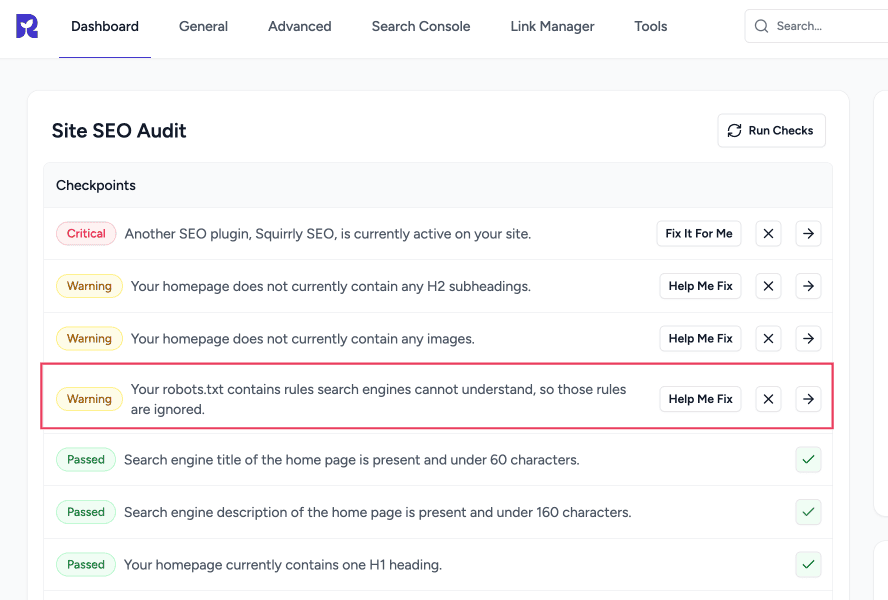
Go to SureRank → Dashboard. You’ll see a Site SEO Audit section (also available as its own page) listing several automatic checks, including one for Robots.txt. Click View Details on that row to see the full explanation.
This is a different screen from the Robots.txt Editor (under Advanced), which is where you manually edit the contents of your robots.txt file. The Analyzer doesn’t let you edit anything. It just reviews what’s already live on your site and tells you if anything looks wrong.
What It Checks
The Analyzer fetches your site’s live, public robots.txt file and checks it for the three most common problems:
- Blocking your entire site from search engines. For example, a rule that accidentally tells search engines not to crawl anything at all. This is the most serious issue it looks for, since it can cause your whole site to drop out of search results.
- Blocking resources search engines need to render your pages. For example, rules that block your theme’s stylesheet or core scripts. Search engines need these to properly understand how your pages look and function. Blocking them can hurt how your site is understood and ranked.
- Rules that search engines can’t understand and will simply ignore. Such as misspelled directives (e.g. “Dissallow” instead of “Disallow”) or rules placed without a proper heading above them. These lines quietly do nothing, which can be surprising if you added them expecting them to work.
What the Results Mean
| Result | What It Means |
| Robots.txt is valid (success) | No issues found. Your file doesn’t contain anything that would hurt your SEO. |
| Robots.txt is missing or inaccessible (warning) | SureRank couldn’t reach a working robots.txt file on your site. |
| Warning: blocked resources | Some rules are blocking assets like CSS or JS that search engines need. |
| Warning: rules search engines can’t understand | Some lines in your file are being ignored because of typos or formatting issues. |
| Error: search engines are blocked from your entire site | The most serious result. Your site may not be getting crawled or indexed at all. |
If more than one issue is present, the Analyzer shows you the most serious one first.
How to Fix a Flagged Issue
- Open SureRank → Advanced → Robots.txt Editor to review your current file.
- If the Analyzer flagged a full-site block, look for a line like Disallow: / under a User-agent: * (or Googlebot) heading, and remove or adjust it so it only blocks what you actually intend to block.
- If it flagged blocked resources, remove or adjust any Disallow rules pointing at your theme, wp-includes, or script/style folders.
- If it flagged unreadable rules, check for typos in directive names (Disallow, Allow, User-agent, Sitemap) and make sure every Allow/Disallow line has a User-agent line above it.
- Save your changes and re-check the Site SEO Audit page. The result updates automatically.
If That Doesn’t Work
If the Analyzer keeps reporting “missing or inaccessible” even though you can see a robots.txt file when you visit it in a browser, or if you’re not sure how to safely edit a rule, please reach out to support with your site URL and we’ll take a look.
We don't respond to the article feedback, we use it to improve our support content.