
- Sitemaps in SureRank
- How to Enable Video Sitemap in SureRank Pro
- How to Enable the News Sitemap in SureRank
- How to Show the HTML Sitemap on Your Site in SureRank Pro
- How to Regenerate the Sitemap After Excluding a Post Type in SureRank
- Change the Sitemap URL in SureRank
- How to Enable Author Sitemap in SureRank
- How to Fix WWW and Non-WWW Version Redirects to Improve Your SEO
- How to Fix: No H1 Heading Found on Your Homepage
- How to Fix Missing H2 Headings on Your Homepage
- Re-run Checks Button in SureRank
- Fix Critical Error: Another SEO Plugin Detected in SureRank
- Fix Warning: Site Tagline Is Not Set in SureRank
- How to Fix: Robots.txt Contains Invalid Rules in SureRank
- How to Fix Multiple SEO Plugins Detected on Your Site
- How to Fix: Homepage is Not Indexable by Search Engines
- Warning: Homepage Does Not Contain Internal Links
- How to Fix: Search Engine Title is Missing on the Page
- Page Level SEO: Broken Links Detected
- How to Fix Missing Alt Text on Images
- How to Fix Page URLs That Are Too Long
- Page Level SEO Warning: No Links Found on This Page
- Page Level SEO Warning: No Images or Videos Found
- Page Level SEO Warning: Missing Search Engine Description
- Page Level SEO Warning: No Subheadings Found on This Page
- Page Level SEO Warning: Canonical Tag is Missing
- Page Level SEO Warning: Open Graph Tags Missing
- What is Google Search Console and how does SureRank use it?
- Recommended Image Sizes
- SureRank – SEO Check Severity Guide
- Using SureRank with Other SEO Plugins – Best Practices
- Import/Export Feature – SureRank Plugin
- What is llms.txt and Does SureRank Support It?
- Does SureRank offer a keyword rank-tracking feature?
- Does SureRank Come With Google Analytics Integration?
- Email Summary in SureRank
- SureRank Role Manager
- Customize XML Sitemap Top Bar with surerank_sitemap_top_bar_data
- Analyze ACF Field Content with SureRank
- Preserve Modified Date During Updates surerank_freeze_modified_date
- Customize Final Title Tag surerank_final_title
- Customize Post Type Archive Title Output surerank_post_type_archive_title
- Customize Archive Page Title with surerank_archive_title
- CustomizeModify the Search Results Page Title surerank_search_title
- Customizing the 404 Page Title surerank_not_found_title
- Customizing the Title Separator surerank_title_separator
- How to Remove Archive Prefixes from Titles Using SureRank
SureRank – Page SEO Checks
The Page SEO Checks feature in SureRank helps you assess how optimized your individual WordPress pages are for search engines. It automatically scans each page for important on-page SEO elements and presents the results in a simple, color-coded format — so you know exactly what needs fixing and what’s already in good shape.
Where to Access Page SEO Checks
You can access SureRank’s Page SEO Checks directly from the WordPress block/page editor.
Steps:
- Open any post or page in the WordPress editor.
- Locate the SureRank panel in the sidebar.
- Click on the Page SEO Checks icon.
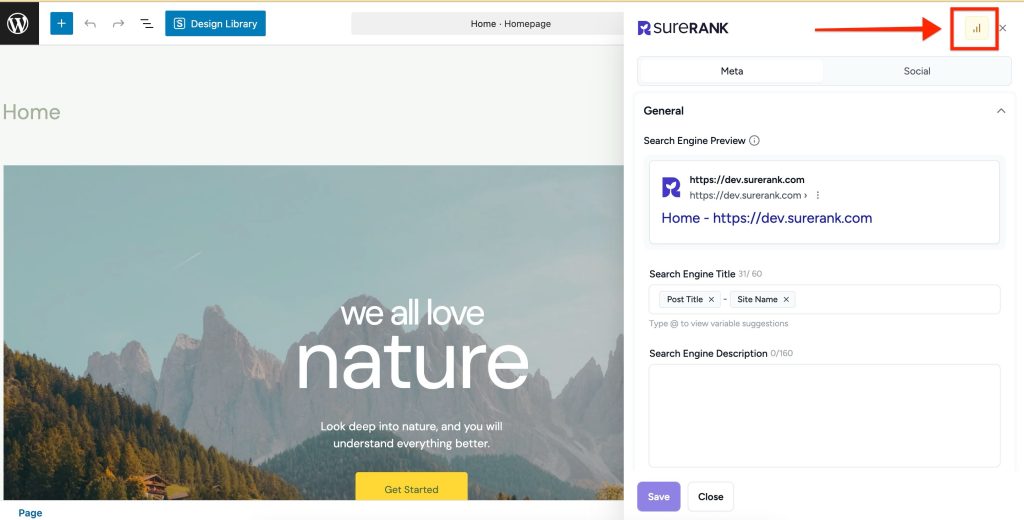
SureRank will then automatically scan and display the SEO analysis for that specific page.
How It Works
Once the check runs, SureRank will present a list of SEO checks grouped under three categories:
Critical SEO Issues
These are significant issues that can negatively impact your rankings or visibility. Fixing them should be your top priority.
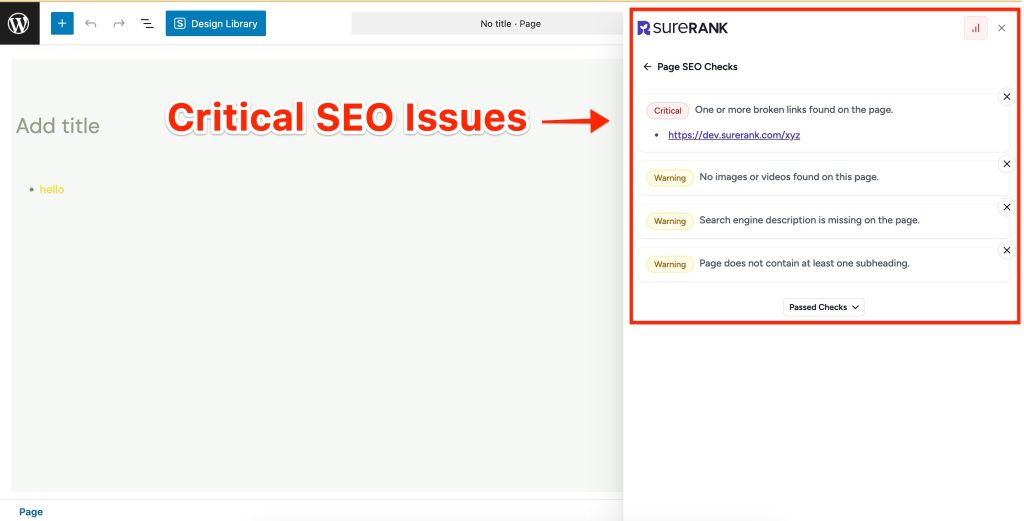
Warnings
These are minor to moderate issues that should be addressed to further improve your SEO score. They don’t block performance, but can impact results if left unresolved.
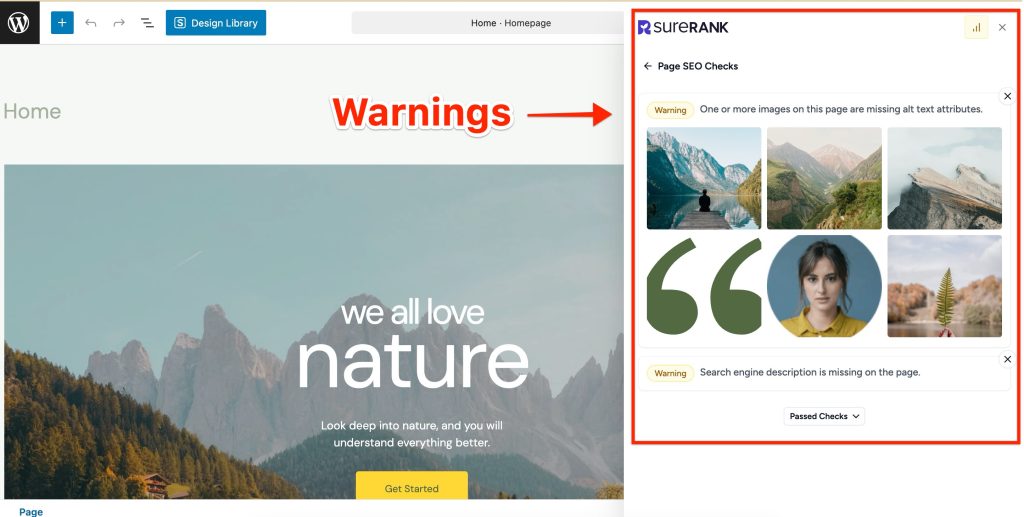
Passed Checks
These are the SEO aspects that are already well-optimized. No action is needed here.
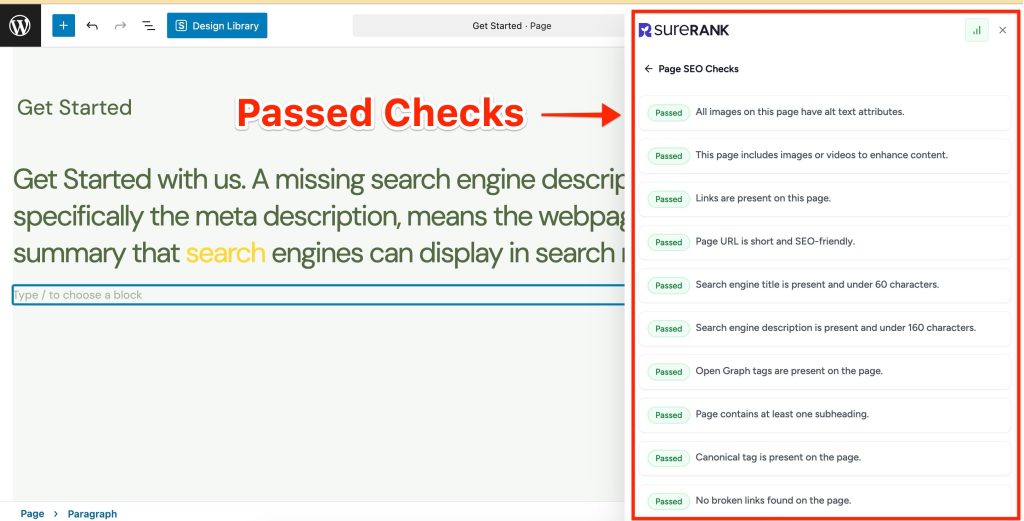
For a full breakdown of what each severity level means and how checks are scored, visit: SureRank SEO Check Severity Guide.
We don't respond to the article feedback, we use it to improve our support content.