
- How to Migrate from Rank Math to SureRank
- How to Migrate from Yoast to SureRank
- How to Migrate from SEOPress to SureRank SEO
- How to Migrate from Squirrly SEO to SureRank
- How to Migrate from All in One SEO (AIOSEO) to SureRank
- How to Migrate from Slim SEO to SureRank
- Migration Failed: How to Diagnose
- After You Migrate: Verification and Cleanup Checklist
- Sitemaps in SureRank
- How to Enable Video Sitemap in SureRank Pro
- How to Enable the News Sitemap in SureRank
- How to Show the HTML Sitemap on Your Site in SureRank Pro
- How to Regenerate the Sitemap After Excluding a Post Type in SureRank
- Change the Sitemap URL in SureRank
- How to Enable Author Sitemap in SureRank
- How to Exclude Post Types from the Sitemap
- How to Enable the Author Sitemap and Why Authors Are Excluded (Pro)
- Editing Meta Box
- SureRank – Page SEO Checks
- Enabling Page SEO Checks in WordPress
- Image Alt Text – Automatic Optimization
- Link Manager
- Using the SureRank Front-End Meta Box
- How to Edit the Meta Title and Description for a Single Page or Post
- Controlling Indexing with Robot Instructions
- How to Set Global Title and Description Templates with Variables
- How to Set a Canonical URL and How the Canonical Field Works
- How to Fix WWW and Non-WWW Version Redirects to Improve Your SEO
- How to Fix: No H1 Heading Found on Your Homepage
- How to Fix Missing H2 Headings on Your Homepage
- Re-run Checks Button in SureRank
- Fix Critical Error: Another SEO Plugin Detected in SureRank
- Fix Warning: Site Tagline Is Not Set in SureRank
- How to Fix: Robots.txt Contains Invalid Rules in SureRank
- How to Fix Multiple SEO Plugins Detected on Your Site
- How to Fix: Homepage is Not Indexable by Search Engines
- Warning: Homepage Does Not Contain Internal Links
- How to Fix: Search Engine Title is Missing on the Page
- Page Level SEO: Broken Links Detected
- How to Fix Missing Alt Text on Images
- How to Fix Page URLs That Are Too Long
- Page Level SEO Warning: No Links Found on This Page
- Page Level SEO Warning: No Images or Videos Found
- Page Level SEO Warning: Missing Search Engine Description
- Page Level SEO Warning: No Subheadings Found on This Page
- Page Level SEO Warning: Canonical Tag is Missing
- Page Level SEO Warning: Open Graph Tags Missing
- What is Google Search Console and how does SureRank use it?
- Recommended Image Sizes
- SureRank – SEO Check Severity Guide
- Using SureRank with Other SEO Plugins – Best Practices
- Import/Export Feature – SureRank Plugin
- What is llms.txt and Does SureRank Support It?
- Does SureRank offer a keyword rank-tracking feature?
- Does SureRank Come With Google Analytics Integration?
- Email Summary in SureRank
- SureRank Role Manager
- Using the Google Indexing API with SureRank
- Managing Third-Party Integrations in SureRank
- Miscellaneous Settings in SureRank
- Setting Per-Author SEO for Author Archive Pages
- Search Engines Not Indexing Your WordPress Site?
- Sitemap Not Showing in SureRank
- Fixing robots.txt Issues in SureRank
- Why a Working Link Is Flagged as Broken (404)
- Which Pages Are Included in Your SureRank Sitemap
- Fixing False SEO Audit Warnings Caused by Caching
- Fixing “Couldn’t Fetch” for Your Sitemap in Google Search Console
- Troubleshooting: Favicon and Logo in Google Search Results (Supported Formats and CDN Gotchas)
- Customize XML Sitemap Top Bar with surerank_sitemap_top_bar_data
- Analyze ACF Field Content with SureRank
- Preserve Modified Date During Updates surerank_freeze_modified_date
- Customize Final Title Tag surerank_final_title
- Customize Post Type Archive Title Output surerank_post_type_archive_title
- Customize Archive Page Title with surerank_archive_title
- CustomizeModify the Search Results Page Title surerank_search_title
- Customizing the 404 Page Title surerank_not_found_title
- Customizing the Title Separator surerank_title_separator
- How to Remove Archive Prefixes from Titles Using SureRank
Email Summary in SureRank
The Email Summary feature in SureRank sends a detailed SEO performance report directly to your email. This report is generated using data from Google Search Console and helps you track your website’s rankings, clicks, impressions, and average position without manual effort.
What Is the Email Summary?
Email Summary is an automated SEO report that provides a weekly snapshot of your website’s search performance.
From the email, you can quickly see:
- Total site clicks
- Total impressions
- Average search position (ranking)
- Top-performing pages
- Performance changes compared to the previous period
This helps you understand how your rankings are moving over time.
Why Is Email Summary Important?
SEO rankings change frequently. The Email Summary helps you:
- Track ranking improvements or drops
- Monitor website performance at a glance
- Understand which pages are ranking better
- Stay updated without logging into dashboards
- Share performance reports with clients or team members
Instead of checking Google Search Console manually, SureRank delivers the insights straight to your inbox.
What Data Is Included in the Email?
The Email Summary includes the following things:
1. Website Performance (Last 7 Days)
This section shows key SEO metrics:
- Site Clicks – Total clicks received from search results
- Total Impressions – How often your site appeared in search
- Average Position – Your website’s average ranking in Google search
Arrows and percentages indicate whether performance has improved or declined compared to the previous period.
2. Top Ranked Posts
This section lists pages performing well in search results, including:
- Page name
- Clicks received
- Average ranking position
- Total impressions
This helps you identify which pages are ranking better and driving traffic.
3. View Full Analysis
A View Full Analysis button is included in the email, allowing you to open SureRank and explore detailed insights inside the dashboard.
Requirements
The Email Summary requires Google Search Console to be connected, with a site selected. This isn’t just a one-time setup requirement. If your GSC connection later expires or is disconnected, report emails will stop sending until it’s reconnected.
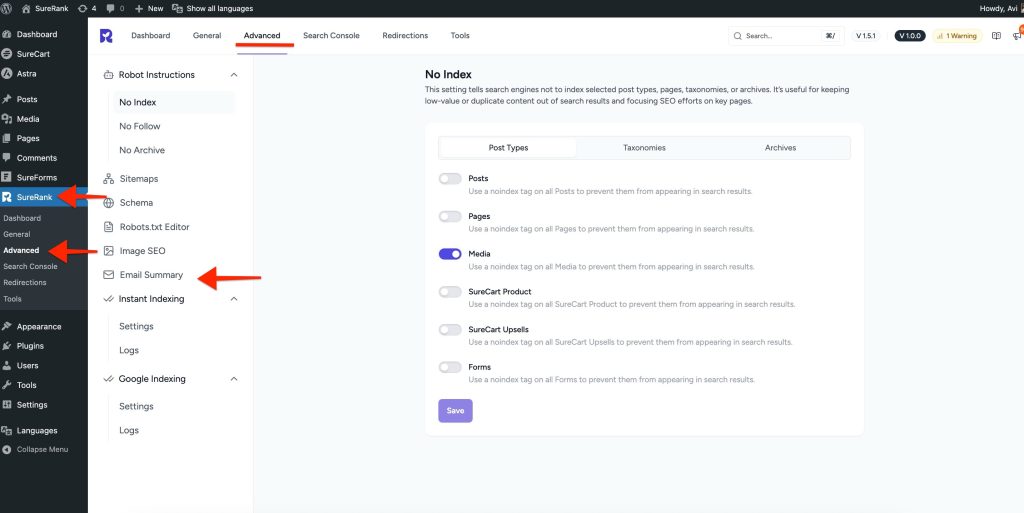
How to Access Email Summary Settings
- Go to WordPress Dashboard
- Navigate to SureRank → Advanced Settings
- Click on Email Summary
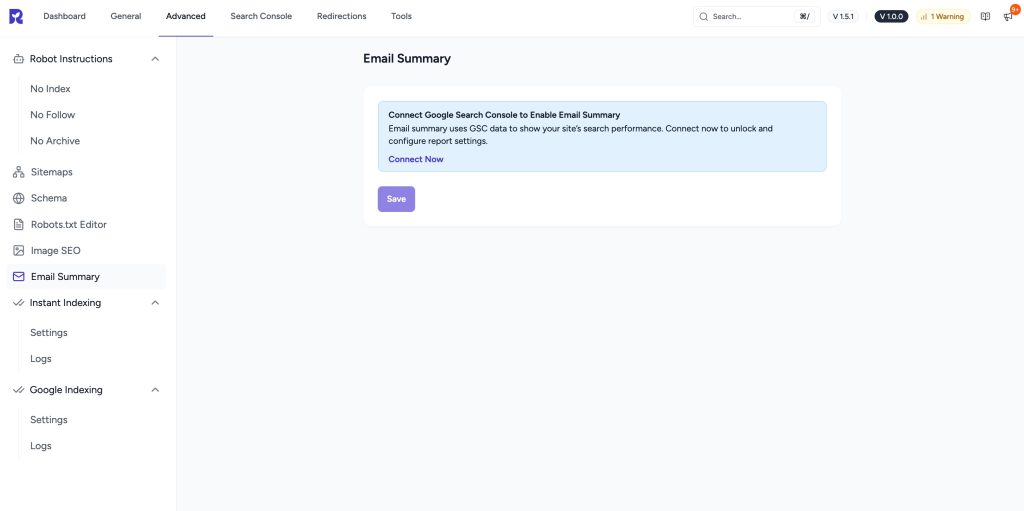
Connect Google Search Console (Required)
Email Summary only works after connecting to Google Search Console.
Steps:
- Click Connect Now
- Sign in with your Google account
- Allow access to Search Console data
- Once connected, Email Summary settings become available
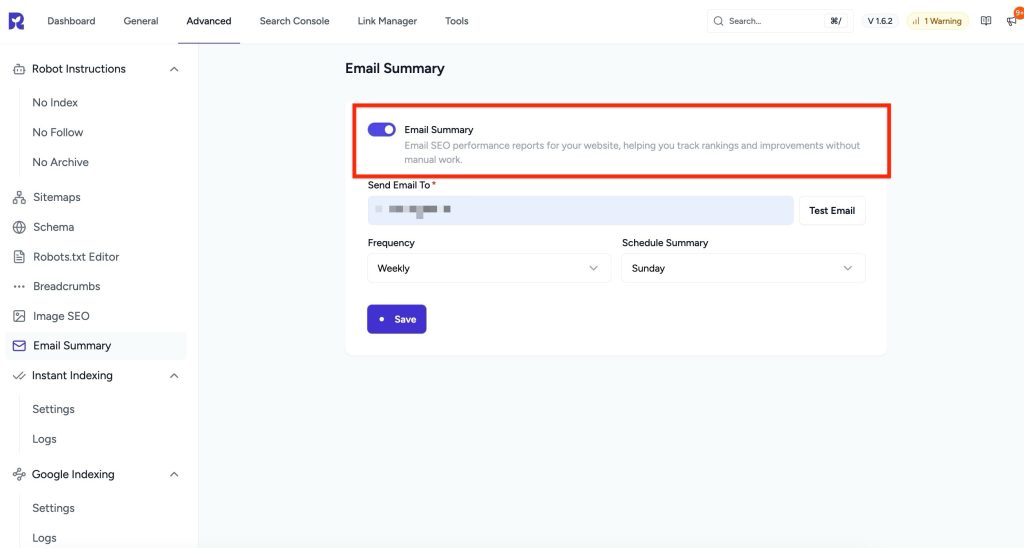
Email Summary – Free Version Features
The following options are available in the Free version of SureRank:
- Enable or disable Email Summary
- Add recipient email address
- Send a test email to preview the report
- Schedule Frequency: weekly/monthly email delivery
- Schedule Summary: Select the day.
These features allow you to track your website’s rankings and performance regularly at no cost.
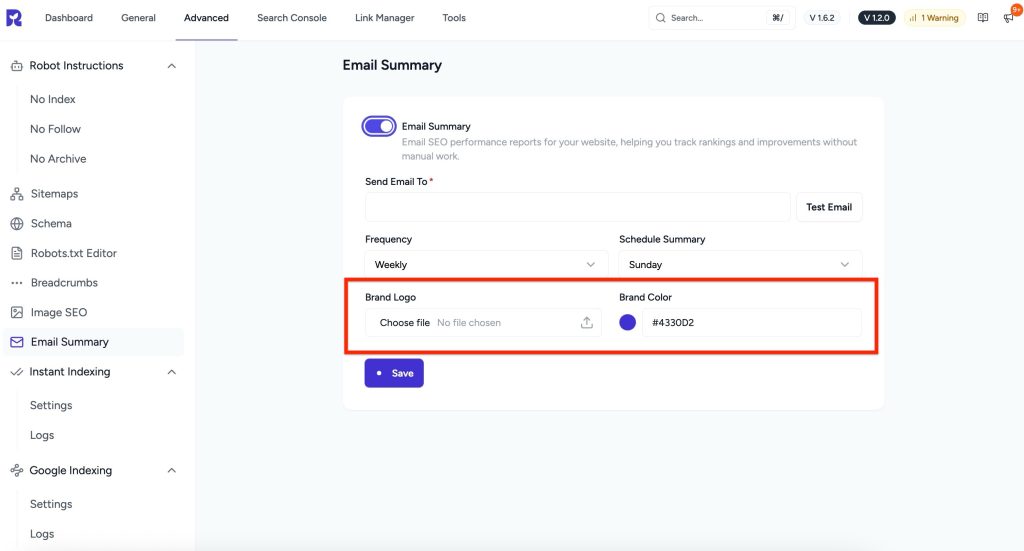
Customizing Email Summary
With the SureRank Premium plugin, you get branding and customization options:
- Add your brand logo to the email
- Set a custom brand color
- Create professional, white-labeled SEO reports
These options are ideal for agencies and client reporting.
Frequently Asked Questions
Can I send the report to more than one email address?
Not currently. Only one recipient can be set per site.
Why didn’t I receive my report?
- Confirm Google Search Console is still connected with a site selected.
- Confirm Email Summary is toggled on and a recipient email is saved.
- Use Test Email to rule out a delivery or spam-filter issue.
- If reports stopped after previously working, your GSC connection may have expired. Reconnect it under Search Console settings.
I’m on Pro but don’t see Brand Logo/Brand Color.
Make sure Email Summary is toggled on first; the whitelabel fields only appear once the feature is enabled. If they’re still missing, confirm your license is active under Settings → License.
Summary
- Email Summary delivers weekly SEO performance reports
- Helps track rankings, impressions, and clicks
- Uses Google Search Console data
- Free version covers core reporting
- Premium version adds branding and white-label support
This feature ensures you stay informed about your website’s SEO performance without manual tracking.
We don't respond to the article feedback, we use it to improve our support content.