
- Sitemaps in SureRank
- How to Enable Video Sitemap in SureRank Pro
- How to Enable the News Sitemap in SureRank
- How to Show the HTML Sitemap on Your Site in SureRank Pro
- How to Regenerate the Sitemap After Excluding a Post Type in SureRank
- Change the Sitemap URL in SureRank
- How to Enable Author Sitemap in SureRank
- Schema Setup in SureRank
- How to Test Schema Markup
- How to Edit Page-Level Schema in SureRank
- Article Schema
- BreadcrumbList
- Organization Schema
- Product Schema
- Person Schema
- SearchAction
- WebPage Schema
- WebSite Schema
- DiscussionForumPosting Schema in SureRank
- How to Add Custom Schema in SureRank
- FAQ Schema in SureRank
- HowTo Schema in SureRank
- Course Schema in SureRank
- Event Schema in SureRank
- Movie Schema in SureRank
- Podcast Schema in SureRank
- Software Application Schema in SureRank
- Dataset Schema in SureRank
- Video Schema in SureRank
- Claim Review Schema in SureRank
- Book Schema in SureRank
- Job Posting Schema in SureRank
- Service Schema in SureRank
- Recipe Schema in SureRank
- How to Use Schema Pro with SureRank
- Local Business Schema in SureRank
- How to Add a Custom Field in SureRank Schema
- How to Fix WWW and Non-WWW Version Redirects to Improve Your SEO
- How to Fix: No H1 Heading Found on Your Homepage
- How to Fix Missing H2 Headings on Your Homepage
- Re-run Checks Button in SureRank
- Fix Critical Error: Another SEO Plugin Detected in SureRank
- Fix Warning: Site Tagline Is Not Set in SureRank
- How to Fix: Robots.txt Contains Invalid Rules in SureRank
- How to Fix Multiple SEO Plugins Detected on Your Site
- How to Fix: Homepage is Not Indexable by Search Engines
- Warning: Homepage Does Not Contain Internal Links
- How to Fix: Search Engine Title is Missing on the Page
- Page Level SEO: Broken Links Detected
- How to Fix Missing Alt Text on Images
- How to Fix Page URLs That Are Too Long
- Page Level SEO Warning: No Links Found on This Page
- Page Level SEO Warning: No Images or Videos Found
- Page Level SEO Warning: Missing Search Engine Description
- Page Level SEO Warning: No Subheadings Found on This Page
- Page Level SEO Warning: Canonical Tag is Missing
- Page Level SEO Warning: Open Graph Tags Missing
- What is Google Search Console and how does SureRank use it?
- Recommended Image Sizes
- SureRank – SEO Check Severity Guide
- Using SureRank with Other SEO Plugins – Best Practices
- Import/Export Feature – SureRank Plugin
- What is llms.txt and Does SureRank Support It?
- Does SureRank offer a keyword rank-tracking feature?
- Does SureRank Come With Google Analytics Integration?
- Email Summary in SureRank
- SureRank Role Manager
- Customize XML Sitemap Top Bar with surerank_sitemap_top_bar_data
- Analyze ACF Field Content with SureRank
- Preserve Modified Date During Updates surerank_freeze_modified_date
- Customize Final Title Tag surerank_final_title
- Customize Post Type Archive Title Output surerank_post_type_archive_title
- Customize Archive Page Title with surerank_archive_title
- CustomizeModify the Search Results Page Title surerank_search_title
- Customizing the 404 Page Title surerank_not_found_title
- Customizing the Title Separator surerank_title_separator
- How to Remove Archive Prefixes from Titles Using SureRank
How to Use Schema Pro with SureRank
If you already use Schema Pro and are happy with its schema implementation, you can continue using it alongside SureRank without any issues.
In this case, you simply need to disable the Schema module inside SureRank to avoid duplicate schema output.
How to disable Schema in SureRank:
- Navigate to SureRank → Tools → Modules
- Locate the Schema module
- Turn the module Off
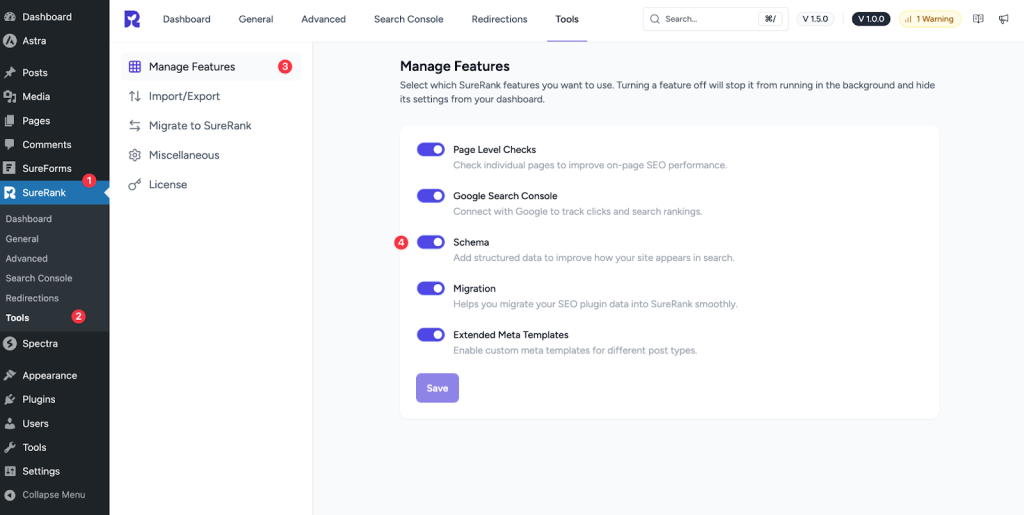
Once disabled, SureRank will no longer generate schema markup, and Schema Pro will handle all schema output for your website.
The key principle to remember is simple: only one plugin should output schema on the same page.
Running both schema systems simultaneously can lead to duplication and validation errors, so choosing one primary source is important for clean markup.
Which Plugin Should Handle Schema?
Both plugins are fully compatible, but each serves different needs.
Use SureRank if:
- Your schema requirements are straightforward
- You want built-in schema as part of your overall SEO workflow
- You prefer a single tool handling multiple SEO tasks
For most websites, SureRank’s schema coverage is sufficient and will meet around 95% of typical needs.
Use Schema Pro if you need:
- Advanced control and customizations
- ACF or custom field mapping
- Schema types or configurations are not yet available in SureRank
- A dedicated schema solution separate from SEO features
Schema Pro provides deeper, fine-grained schema customization that some niche websites may require.
Can Both Plugins Run Together?
Yes. Schema Pro and SureRank can coexist on the same website without any conflict, as long as only one plugin is configured to output schema as explained above.
Choose the tool that fits your schema needs best, disable the other plugin’s schema feature, and everything will work smoothly.
We don't respond to the article feedback, we use it to improve our support content.