
- Sitemaps in SureRank
- How to Enable Video Sitemap in SureRank Pro
- How to Enable the News Sitemap in SureRank
- How to Show the HTML Sitemap on Your Site in SureRank Pro
- How to Regenerate the Sitemap After Excluding a Post Type in SureRank
- Change the Sitemap URL in SureRank
- How to Enable Author Sitemap in SureRank
- Schema Setup in SureRank
- How to Test Schema Markup
- How to Edit Page-Level Schema in SureRank
- Article Schema
- BreadcrumbList
- Organization Schema
- Product Schema
- Person Schema
- SearchAction
- WebPage Schema
- WebSite Schema
- DiscussionForumPosting Schema in SureRank
- How to Add Custom Schema in SureRank
- FAQ Schema in SureRank
- HowTo Schema in SureRank
- Course Schema in SureRank
- Event Schema in SureRank
- Movie Schema in SureRank
- Podcast Schema in SureRank
- Software Application Schema in SureRank
- Dataset Schema in SureRank
- Video Schema in SureRank
- Claim Review Schema in SureRank
- Book Schema in SureRank
- Job Posting Schema in SureRank
- Service Schema in SureRank
- Recipe Schema in SureRank
- How to Use Schema Pro with SureRank
- Local Business Schema in SureRank
- How to Add a Custom Field in SureRank Schema
- How to Fix WWW and Non-WWW Version Redirects to Improve Your SEO
- How to Fix: No H1 Heading Found on Your Homepage
- How to Fix Missing H2 Headings on Your Homepage
- Re-run Checks Button in SureRank
- Fix Critical Error: Another SEO Plugin Detected in SureRank
- Fix Warning: Site Tagline Is Not Set in SureRank
- How to Fix: Robots.txt Contains Invalid Rules in SureRank
- How to Fix Multiple SEO Plugins Detected on Your Site
- How to Fix: Homepage is Not Indexable by Search Engines
- Warning: Homepage Does Not Contain Internal Links
- How to Fix: Search Engine Title is Missing on the Page
- Page Level SEO: Broken Links Detected
- How to Fix Missing Alt Text on Images
- How to Fix Page URLs That Are Too Long
- Page Level SEO Warning: No Links Found on This Page
- Page Level SEO Warning: No Images or Videos Found
- Page Level SEO Warning: Missing Search Engine Description
- Page Level SEO Warning: No Subheadings Found on This Page
- Page Level SEO Warning: Canonical Tag is Missing
- Page Level SEO Warning: Open Graph Tags Missing
- What is Google Search Console and how does SureRank use it?
- Recommended Image Sizes
- SureRank – SEO Check Severity Guide
- Using SureRank with Other SEO Plugins – Best Practices
- Import/Export Feature – SureRank Plugin
- What is llms.txt and Does SureRank Support It?
- Does SureRank offer a keyword rank-tracking feature?
- Does SureRank Come With Google Analytics Integration?
- Email Summary in SureRank
- SureRank Role Manager
- Customize XML Sitemap Top Bar with surerank_sitemap_top_bar_data
- Analyze ACF Field Content with SureRank
- Preserve Modified Date During Updates surerank_freeze_modified_date
- Customize Final Title Tag surerank_final_title
- Customize Post Type Archive Title Output surerank_post_type_archive_title
- Customize Archive Page Title with surerank_archive_title
- CustomizeModify the Search Results Page Title surerank_search_title
- Customizing the 404 Page Title surerank_not_found_title
- Customizing the Title Separator surerank_title_separator
- How to Remove Archive Prefixes from Titles Using SureRank
DiscussionForumPosting Schema in SureRank
The DiscussionForumPosting Schema (also known as Forum Schema) in SureRank helps search engines understand details about forum threads and community discussions on your website. By adding structured data, you can make your discussion posts eligible for enhanced search results in Google Search, such as showing the question title, author name, publish date, and number of replies directly in search listings.
This schema is especially useful for:
- Online communities and forums
- Support and help desk discussions
- Q&A websites
- Product or service discussion boards
- Member-only community platforms
Adding a DiscussionForumPosting Schema can improve your content’s visibility in search results and attract more users to join the conversation. It helps highlight key details like the discussion topic, author, date posted, and engagement metrics, making your forum content more discoverable and engaging.
Creating a DiscussionForumPosting Schema
Follow the steps below to add and configure the DiscussionForumPosting Schema using SureRank.
- Click on the Add Schema button.
- A popup will appear. From the dropdown menu, select DiscussionForumPosting Schema.
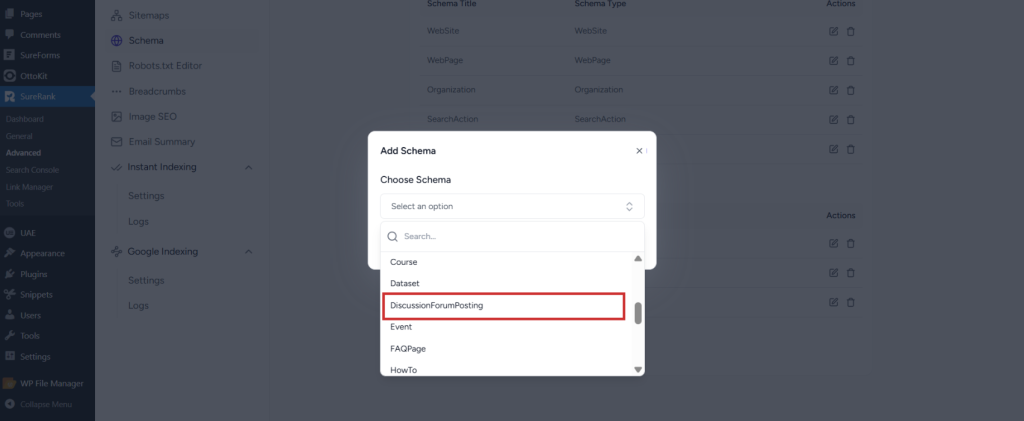
- Click on the Add Schema button to create the DiscussionForumPosting Schema.
- Once created, the DiscussionForumPosting Schema configuration page will appear, containing two tabs:
- Properties
- Display Conditions
Properties Tab
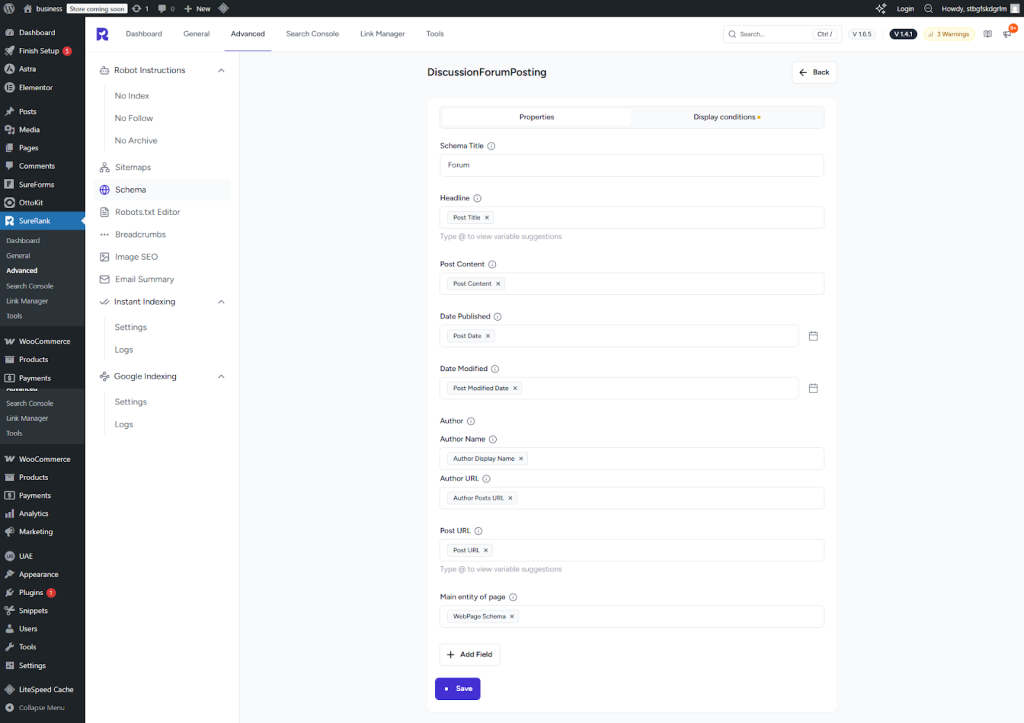
The Properties tab contains a list of fields for rich results. Fields marked with an asterisk (*) are mandatory.
Here’s a breakdown of each field:
DiscussionForumPosting Schema – Property Descriptions
Basic Post Information
| Field Name | Description | Required |
| Schema Title | Add a custom title for internal reference. | No |
| Headline | Title or headline of the forum post. | No |
| Post Content | Main content or body of the forum post. | No |
| Date Published | Date when the post was published. | No |
| Author | ||
| Author Name | Name of the post author. | No |
| Author URL | Website or profile URL of the author. | No |
| Post URL | Direct URL of the forum post. | No |
| Main Entity of Page | Marks the discussion post as the main content of the webpage. | No |
Additional Fields (Using “Add Field” Button)
| Field Name | Description | Required |
| Image | Image associated with the post. | No |
| Shared Content URL | URL of content shared within the post. | No |
| Post Status | Select from drop-down: Published or Deleted. | No |
Comments (Repeatable Section)
| Field Name | Description | Required |
| Comment Author | ||
| Author Name | Name of the comment author. | No |
| Author URL | Profile or website URL of the comment author. | No |
| Comment Text | Text content of the comment. | No |
| Comment Date | Date when the comment was posted. | No |
| Comment URL | Direct URL of the comment (if available). | No |
| Add New Button | Add additional comments. | – |
Interaction Statistics (Repeatable Section)
| Field Name | Description | Required |
| Opening Hours 1 | ||
| Interaction Type | Select from drop-down: Comment Action, Like Action, Share Action, View Action. | No |
| Interaction Count | Number of interactions for the selected action type. | No |
| Add New Button | Add additional interaction entries. | – |
Forum Details
| Field Name | Description | Required |
| Forum Section | Name of the forum section or category. | No |
| Language | Language of the post (use two-letter ISO code, e.g., EN). | No |
| Is Part Of | Indicates if the post belongs to a larger thread or forum collection. | No |
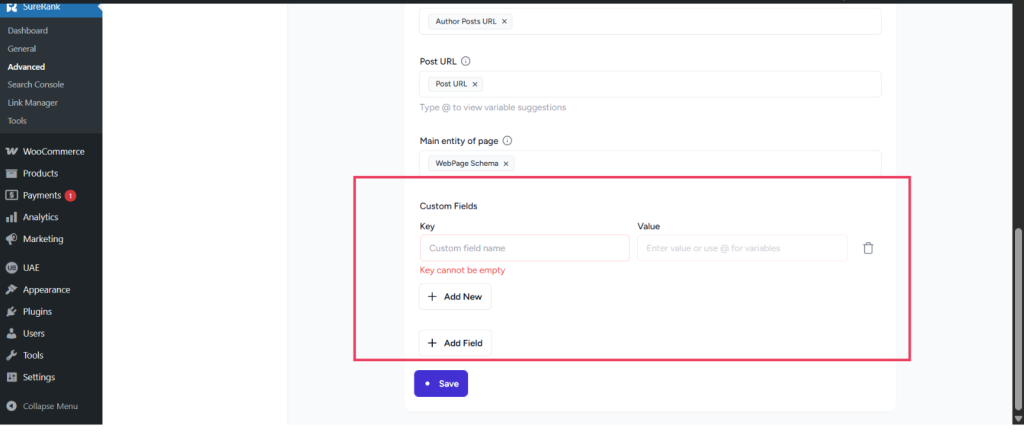
Custom Fields (Repeatable Section)
| Field Name | Description | Required |
| Custom Fields | Add additional structured properties if needed. | |
| Key | Property name. | Yes |
| Value | Property value. | Yes |
| Add New | Add additional custom fields. | – |
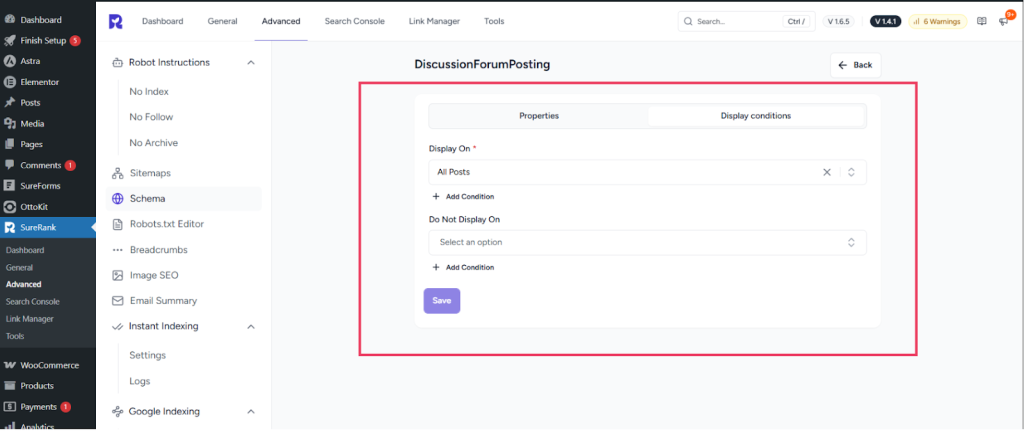
Display Conditions Tab
- Display On: Select where you want the DiscussionForumPosting Schema to appear (Required field).
- Do Not Display On: Define where the schema should not be applied.
Verifying the Schema
Once you have configured the schema, verify its correctness using one of the following tools:
This ensures your structured data is properly configured and eligible for rich results in search engines.
We don't respond to the article feedback, we use it to improve our support content.