
- How to Migrate from Rank Math to SureRank
- How to Migrate from Yoast to SureRank
- How to Migrate from SEOPress to SureRank SEO
- How to Migrate from Squirrly SEO to SureRank
- How to Migrate from All in One SEO (AIOSEO) to SureRank
- How to Migrate from Slim SEO to SureRank
- How to Migrate from The SEO Framework to SureRank
- Migration Failed: How to Diagnose
- After You Migrate: Verification and Cleanup Checklist
- Sitemaps in SureRank
- How to Enable Video Sitemap in SureRank Pro
- How to Enable the News Sitemap in SureRank
- How to Show the HTML Sitemap on Your Site in SureRank Pro
- How to Regenerate the Sitemap After Excluding a Post Type in SureRank
- Change the Sitemap URL in SureRank
- How to Enable Author Sitemap in SureRank
- How to Exclude Post Types from the Sitemap
- How to Enable the Author Sitemap and Why Authors Are Excluded (Pro)
- Editing Meta Box
- SureRank – Page SEO Checks
- Enabling Page SEO Checks in WordPress
- Image Alt Text – Automatic Optimization
- Link Manager
- Using the SureRank Front-End Meta Box
- How to Edit the Meta Title and Description for a Single Page or Post
- Controlling Indexing with Robot Instructions
- How to Set Global Title and Description Templates with Variables
- How to Set a Canonical URL and How the Canonical Field Works
- How to Fix WWW and Non-WWW Version Redirects to Improve Your SEO
- How to Fix: No H1 Heading Found on Your Homepage
- How to Fix Missing H2 Headings on Your Homepage
- Re-run Checks Button in SureRank
- Fix Critical Error: Another SEO Plugin Detected in SureRank
- Fix Warning: Site Tagline Is Not Set in SureRank
- How to Fix: Robots.txt Contains Invalid Rules in SureRank
- How to Fix Multiple SEO Plugins Detected on Your Site
- How to Fix: Homepage is Not Indexable by Search Engines
- Warning: Homepage Does Not Contain Internal Links
- How to Fix: Search Engine Title is Missing on the Page
- Page Level SEO: Broken Links Detected
- How to Fix Missing Alt Text on Images
- How to Fix Page URLs That Are Too Long
- Page Level SEO Warning: No Links Found on This Page
- Page Level SEO Warning: No Images or Videos Found
- Page Level SEO Warning: Missing Search Engine Description
- Page Level SEO Warning: No Subheadings Found on This Page
- Page Level SEO Warning: Canonical Tag is Missing
- Page Level SEO Warning: Open Graph Tags Missing
- What is Google Search Console and how does SureRank use it?
- Recommended Image Sizes
- SureRank – SEO Check Severity Guide
- Using SureRank with Other SEO Plugins – Best Practices
- Import/Export Feature – SureRank Plugin
- What is llms.txt and Does SureRank Support It?
- Does SureRank offer a keyword rank-tracking feature?
- Does SureRank Come With Google Analytics Integration?
- Email Summary in SureRank
- SureRank Role Manager
- Fixing a Fatal Error After Updating SureRank
- SureRank Server Requirements
- Search Engines Not Indexing Your WordPress Site?
- Sitemap Not Showing in SureRank
- Fixing robots.txt Issues in SureRank
- Why a Working Link Is Flagged as Broken (404)
- Which Pages Are Included in Your SureRank Sitemap
- Fixing False SEO Audit Warnings Caused by Caching
- Fixing “Couldn’t Fetch” for Your Sitemap in Google Search Console
- Troubleshooting: Favicon and Logo in Google Search Results (Supported Formats and CDN Gotchas)
- Customize XML Sitemap Top Bar with surerank_sitemap_top_bar_data
- Analyze ACF Field Content with SureRank
- Preserve Modified Date During Updates surerank_freeze_modified_date
- Customize Final Title Tag surerank_final_title
- Customize Post Type Archive Title Output surerank_post_type_archive_title
- Customize Archive Page Title with surerank_archive_title
- CustomizeModify the Search Results Page Title surerank_search_title
- Customizing the 404 Page Title surerank_not_found_title
- Customizing the Title Separator surerank_title_separator
- How to Remove Archive Prefixes from Titles Using SureRank
SureRank Server Requirements
SureRank runs on most standard WordPress hosting. This article lists what it needs, what it recommends, and how to check each item on your own server.
If a feature fails with a server error rather than a message from the plugin, this is the first page to check.
Minimum Requirements
- WordPress – 6.7 or later.
- PHP – 7.4 or later. PHP 8.1 or later is recommended.
- DOM and XML support in PHP – Used to read your page content for SEO checks and to build your XML sitemap. These are enabled by default on virtually all hosting.
How to Check Your Server
- Go to Tools → Site Health → Info in your WordPress admin.
- Open the Server section.
- Confirm the PHP version is 7.4 or later.
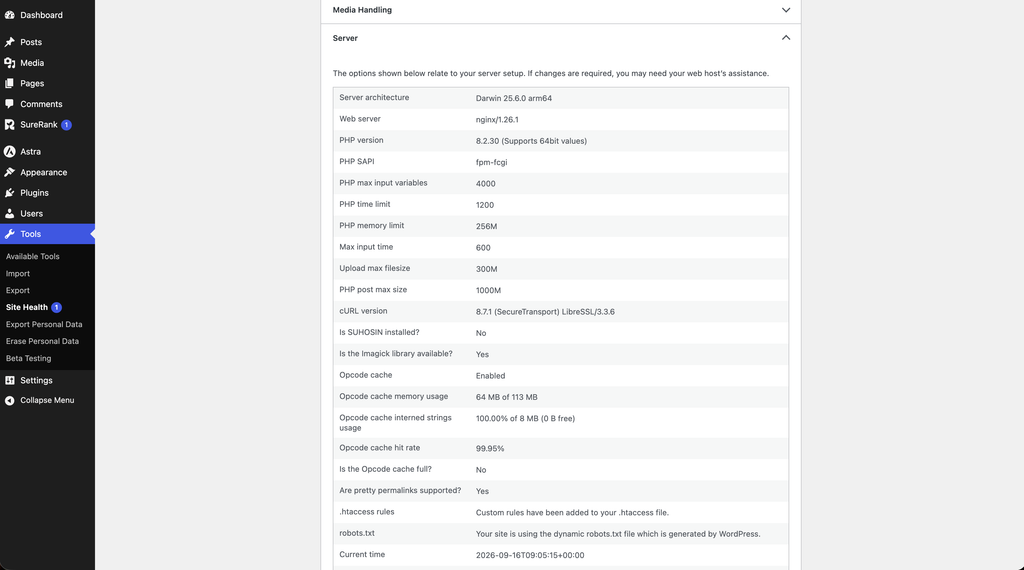
If your PHP version is older than 7.4, ask your host to move the site to a supported version. Most hosting control panels let you change this yourself.
Recommended Settings
These are not strict requirements, but low limits cause slow or incomplete results on larger sites.
- PHP memory limit – 256M or higher.
- Max execution time – 60 seconds or higher, which helps sitemap and bulk operations finish.
- WP-Cron enabled, or a real server cron running
wp-cron.php. Email summaries rely on it, as does the optional pre-build sitemap mode.
How Sitemaps Are Built
By default SureRank builds each sitemap when it is requested, so no scheduled task is needed to keep it up to date.
A pre-build mode is available for very large sites, where a scheduled task builds the whole sitemap ahead of time. That mode depends on WP-Cron. If the loopback request it uses is blocked, SureRank falls back to building within the same request instead, so the sitemap still rebuilds.
Checking Your PHP Extensions
- Go to Tools → Site Health → Info.
- Open the PHP Extensions section.
Most hosts will enable a standard extension on request or through your hosting control panel.
Troubleshooting
- Checks never finish, or the spinner keeps running – Check Tools → Site Health → Status for a loopback warning, and review any security plugin or firewall that may be blocking internal requests.
- Sitemap builds stall on a large site – Raise the PHP memory limit and max execution time, then rebuild.
- A feature works in the admin but not on the front end – Clear any page cache and CDN cache, then retest.
- An error mentions an undefined function – Update SureRank to the latest version first, then check the PHP Extensions list if it continues.
- Email summaries never arrive – Confirm WP-Cron is running. Some hosts disable it in favour of a server cron.
Next Steps
If your server meets these requirements and something still fails, see Fixing a Fatal Error After Updating SureRank.
We don't respond to the article feedback, we use it to improve our support content.