
- Installing SureRank
- SureRank Onboarding Guide
- How to Activate Your SureRank Pro License
- SureRank Dashboard Overview
- General Settings
- Advanced Settings
- Search Console – SureRank
- Managing URL Redirection in SureRank
- SureRank Feature Management – Quick Guide
- Robots.txt Feature in SureRank
- Instant Indexing in SureRank Pro
- Using the Focus Keyword Feature in SureRank
- Image SEO – SureRank
- Google Indexing in SureRank
- How to Configure Custom Fields with SureRank
- Breadcrumbs Feature in SureRank Pro
- Extended Meta Templates in SureRank Pro
- SureRank Pro – Link Suggestions
- Sitemaps in SureRank
- How to Enable Video Sitemap in SureRank Pro
- How to Enable the News Sitemap in SureRank
- How to Show the HTML Sitemap on Your Site in SureRank Pro
- How to Regenerate the Sitemap After Excluding a Post Type in SureRank
- Change the Sitemap URL in SureRank
- How to Enable Author Sitemap in SureRank
- How to Fix WWW and Non-WWW Version Redirects to Improve Your SEO
- How to Fix: No H1 Heading Found on Your Homepage
- How to Fix Missing H2 Headings on Your Homepage
- Re-run Checks Button in SureRank
- Fix Critical Error: Another SEO Plugin Detected in SureRank
- Fix Warning: Site Tagline Is Not Set in SureRank
- How to Fix: Robots.txt Contains Invalid Rules in SureRank
- How to Fix Multiple SEO Plugins Detected on Your Site
- How to Fix: Homepage is Not Indexable by Search Engines
- Warning: Homepage Does Not Contain Internal Links
- How to Fix: Search Engine Title is Missing on the Page
- Page Level SEO: Broken Links Detected
- How to Fix Missing Alt Text on Images
- How to Fix Page URLs That Are Too Long
- Page Level SEO Warning: No Links Found on This Page
- Page Level SEO Warning: No Images or Videos Found
- Page Level SEO Warning: Missing Search Engine Description
- Page Level SEO Warning: No Subheadings Found on This Page
- Page Level SEO Warning: Canonical Tag is Missing
- Page Level SEO Warning: Open Graph Tags Missing
- What is Google Search Console and how does SureRank use it?
- Recommended Image Sizes
- SureRank – SEO Check Severity Guide
- Using SureRank with Other SEO Plugins – Best Practices
- Import/Export Feature – SureRank Plugin
- What is llms.txt and Does SureRank Support It?
- Does SureRank offer a keyword rank-tracking feature?
- Does SureRank Come With Google Analytics Integration?
- Email Summary in SureRank
- SureRank Role Manager
- Customize XML Sitemap Top Bar with surerank_sitemap_top_bar_data
- Analyze ACF Field Content with SureRank
- Preserve Modified Date During Updates surerank_freeze_modified_date
- Customize Final Title Tag surerank_final_title
- Customize Post Type Archive Title Output surerank_post_type_archive_title
- Customize Archive Page Title with surerank_archive_title
- CustomizeModify the Search Results Page Title surerank_search_title
- Customizing the 404 Page Title surerank_not_found_title
- Customizing the Title Separator surerank_title_separator
- How to Remove Archive Prefixes from Titles Using SureRank
Extended Meta Templates in SureRank Pro
The Extended Meta Templates feature in SureRank Pro allows you to manage SEO meta templates for more areas of your website, such as taxonomy pages and archive pages.
This guide explains how to enable this feature and where to find the new options.
How to Enable Extended Meta Templates
Follow the steps below to enable the Extended Meta Templates feature.
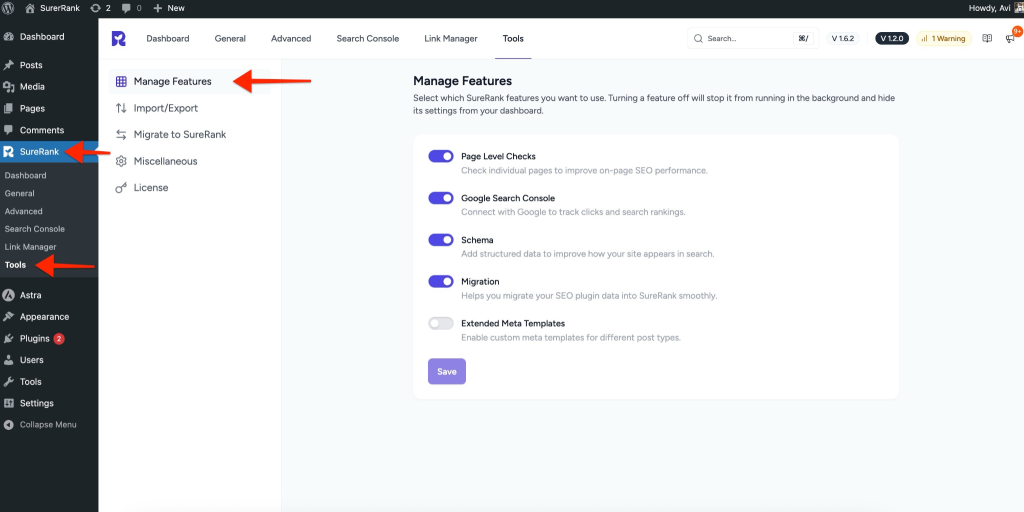
Step 1: Open SureRank Tools
- Go to your WordPress dashboard.
- Navigate to SureRank → Tools.
Step 2: Enable Extended Meta Templates
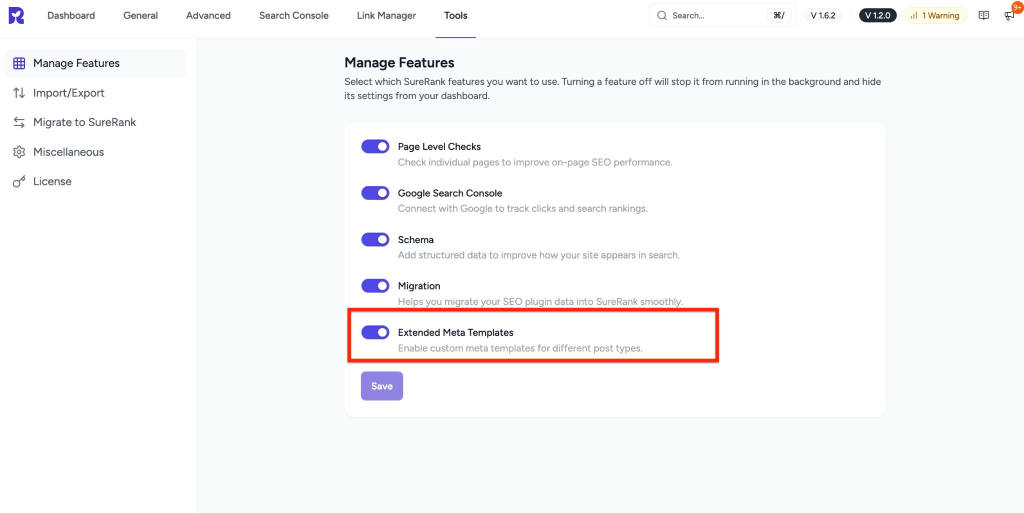
- Find the option named Extended Meta Templates.
- Enable the toggle.
- Click Save to apply the changes.
Accessing Extended Meta Template Options
Once the feature is enabled, new meta template options will be available in the General settings.
Step 3: Go to General Settings
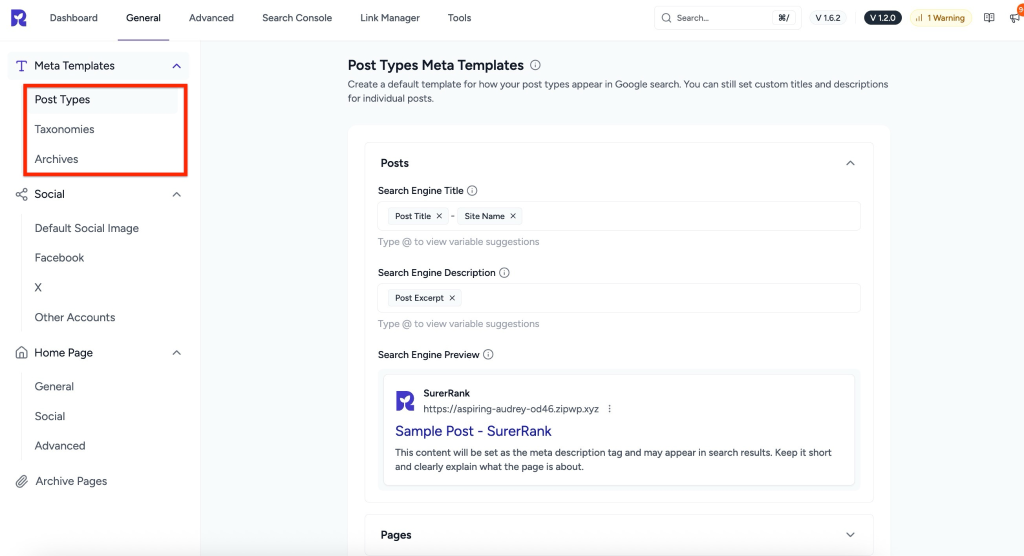
- Navigate to SureRank → General.
- Open the Meta Templates section.
Step 4: View Newly Added Template Types
After enabling Extended Meta Templates, you will see additional template options, including:
- Post Types
- Posts
- Pages
- Taxonomies
- Categories
- Tags
- Other custom taxonomies (if available)
- Archives
- All archive pages are available on your site (based on your content and post types)
These options allow you to define SEO titles and meta descriptions for archive and taxonomy pages more efficiently.
Summary
By enabling Extended Meta Templates, you can:
- Control SEO metadata for taxonomy pages, like categories and tags
- Manage archive page SEO from a single place
- Create consistent SEO templates across your entire website
This helps improve SEO coverage without manually editing each page.
We don't respond to the article feedback, we use it to improve our support content.