
- Sitemaps in SureRank
- How to Enable Video Sitemap in SureRank Pro
- How to Enable the News Sitemap in SureRank
- How to Show the HTML Sitemap on Your Site in SureRank Pro
- How to Regenerate the Sitemap After Excluding a Post Type in SureRank
- Change the Sitemap URL in SureRank
- How to Enable Author Sitemap in SureRank
- How to Fix WWW and Non-WWW Version Redirects to Improve Your SEO
- How to Fix: No H1 Heading Found on Your Homepage
- How to Fix Missing H2 Headings on Your Homepage
- Re-run Checks Button in SureRank
- Fix Critical Error: Another SEO Plugin Detected in SureRank
- Fix Warning: Site Tagline Is Not Set in SureRank
- How to Fix Multiple SEO Plugins Detected on Your Site
- How to Fix: Homepage is Not Indexable by Search Engines
- Warning: Homepage Does Not Contain Internal Links
- How to Fix Missing Alt Text on Homepage Images
- How to Fix: Search Engine Title is Missing on the Page
- Page Level SEO: Broken Links Detected
- How to Fix Missing Alt Text on Images
- How to Fix Page URLs That Are Too Long
- Page Level SEO Warning: No Links Found on This Page
- Page Level SEO Warning: No Images or Videos Found
- Page Level SEO Warning: Missing Search Engine Description
- Page Level SEO Warning: No Subheadings Found on This Page
- Page Level SEO Warning: Canonical Tag is Missing
- Page Level SEO Warning: Open Graph Tags Missing
- What is Google Search Console and how does SureRank use it?
- Recommended Image Sizes
- SureRank – SEO Check Severity Guide
- Using SureRank with Other SEO Plugins – Best Practices
- Import/Export Feature – SureRank Plugin
- What is llms.txt and Does SureRank Support It?
- Does SureRank offer a keyword rank-tracking feature?
- Does SureRank Come With Google Analytics Integration?
- Email Summary in SureRank
- SureRank Role Manager
- Customize Final Title Tag surerank_final_title
- Customize Post Type Archive Title Output surerank_post_type_archive_title
- Customize Archive Page Title with surerank_archive_title
- CustomizeModify the Search Results Page Title surerank_search_title
- Customizing the 404 Page Title surerank_not_found_title
- Customizing the Title Separator surerank_title_separator
- How to Remove Archive Prefixes from Titles Using SureRank
- Customize Homepage Pagination Format surerank_homepage_pagination_format
- Customize Maximum SEO Title Length surerank_title_length
- Enable/Disable Pagination in SureRank Archives surerank_show_pagination
Critical SEO Detection
The SureRank platform includes a powerful feature called Critical SEO Detection, designed to help you identify and resolve the most urgent SEO issues on your website.
Critical SEO Detection Indicator
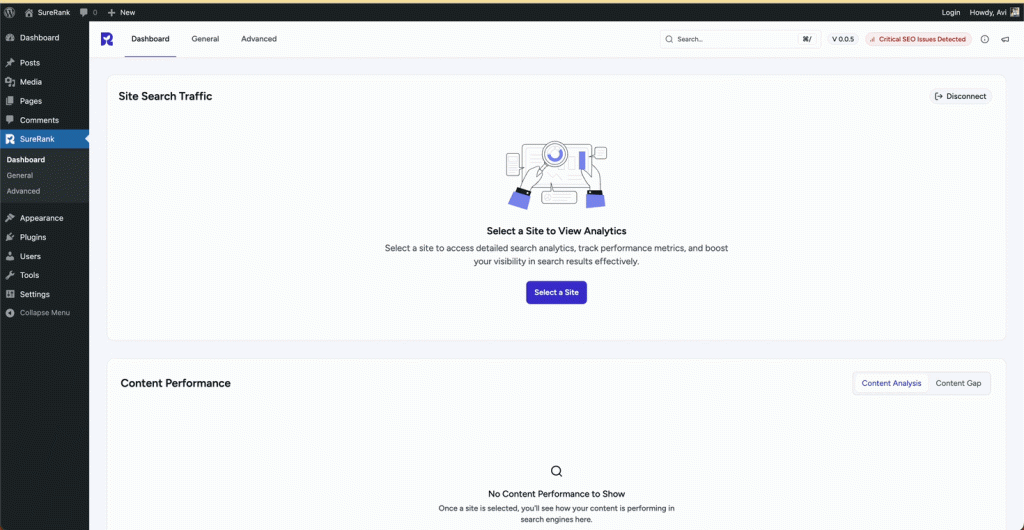
- A red indicator is prominently displayed in the header section of the SureRank interface.
- This red color signals the presence of critical SEO issues that need immediate attention.
Navigation to SEO Analysis
- Clicking on the Critical SEO Detection indicator takes you directly to the Site SEO Analysis page.
- This page provides a detailed overview of all identified SEO issues across your entire website.
SEO Issue Status for Each Page
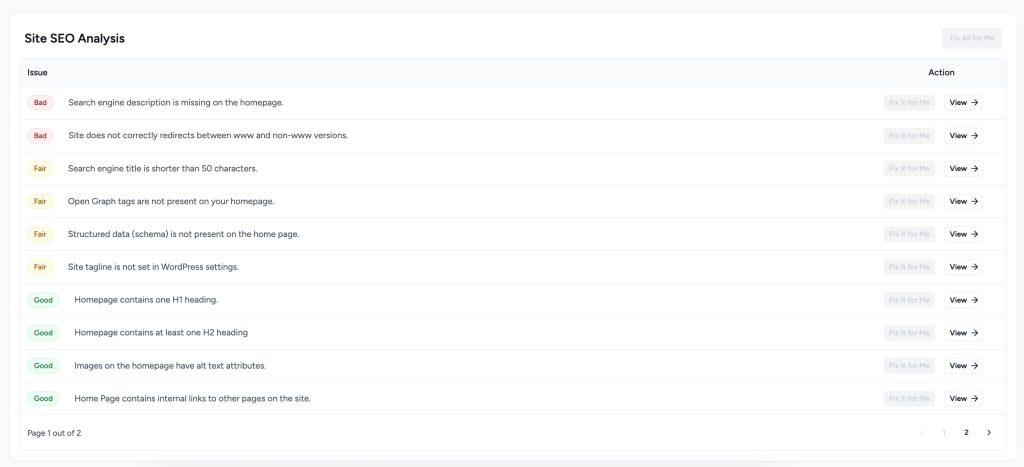
Each page is evaluated and assigned an SEO status label:
- Good: The page adheres to SEO best practices. No immediate changes are needed.
- Fair: Minor improvements are recommended to enhance SEO performance.
- Bad: Serious SEO issues are present that must be addressed to improve search visibility.
Pagination and Detailed View
- If your site has many pages, the SEO Analysis page includes pagination for better navigation.
- Each page entry has a “View” button that opens a detailed report with:
- The exact issues detected
- Contextual explanations
- Suggested actions for improvement
- The exact issues detected
Benefits
This structured approach empowers website owners, marketers, and developers to:
- Proactively monitor SEO health
- Quickly identify and prioritize critical issues
- Take focused action to improve rankings and performance
By using Critical SEO Detection, you’ll ensure your site remains optimized and competitive in search results.
Was this doc helpful?
What went wrong?
We don't respond to the article feedback, we use it to improve our support content.
Table of Contents