
By SureRank Team
You published a post last Tuesday. You meant to write the meta description. You forgot.
You planned to add alt text to the images. Still pending.
You wanted to set up that redirect after renaming the page. It is sitting in a browser tab somewhere. And the internal links you were supposed to weave across your last five posts? You will get to those this weekend.
Here is the thing. This is not a discipline problem. This is a volume problem.
Manual SEO is genuinely exhausting. Research shows that most website owners spend between 4 and 7 hours every single week on SEO tasks alone. And a huge chunk of that time goes toward tasks that are repetitive, predictable, and honestly? Should not require a human brain at all.
The good news is that in 2026, nearly every routine SEO task can be automated. Not partially. Not approximately. Fully.
This guide covers 10 practical ways to put your WordPress SEO on autopilot, so the right things happen every time you publish, without you having to remember them.
What Is SEO Automation?
SEO automation is the use of software and AI to handle repetitive, rules-based SEO tasks automatically, without manual input each time.
At its simplest, it means your sitemap updates itself when you publish a new post. At its most powerful, it means AI generates your meta tags, audits your entire site, and suggests internal links, all before you even click publish.
The goal is not to replace your SEO strategy. Automation cannot tell you which topics to target or what angle will resonate with your audience. That still requires judgment.
What automation can do is handle the execution layer, the dozens of small, consistent tasks that need to happen on every post, every page, every time. Done manually, those tasks add up fast. Automated, they become invisible infrastructure.
Why Manual SEO Does Not Scale
Most WordPress sites start small. One owner. Maybe ten posts. At that scale, doing everything manually is manageable. Then the site grows.
Twenty posts becomes fifty. Fifty becomes two hundred. Every time you publish something new, there are more internal link opportunities to find, more meta descriptions to write, more images to tag, more schema to apply.
The manual approach has a ceiling. Once you hit it, either quality drops or publishing slows down. Neither is acceptable when you are trying to build traffic.
Automation removes that ceiling. You can manage a 200-page site with the same consistency and quality as a 20-page one.
10 Ways to Put Your WordPress SEO on Autopilot
1. Automate Your XML Sitemap Generation and Submission
Every time you publish a new post, page, or product, Google needs to know it exists.
Without a sitemap, search engines will find your content eventually. But “eventually” could mean days or weeks. For a site trying to build momentum, that delay is unnecessary.
An automated sitemap removes the problem completely.
- It generates your sitemap the moment you install your SEO plugin, no manual building required.
- It updates automatically every time new content is published.
- It stays current whether you publish once a week or twice a day.
Once you submit your sitemap URL to Google Search Console, the process is entirely hands-off from that point forward.
How SureRank handles it: SureRank generates your XML sitemap automatically and keeps it updated as your site grows. For Pro users, it also generates HTML, News, and Video sitemaps for more advanced indexing coverage. You do not touch it. It just works.
Learn how to set up your WordPress sitemap the right way.
2. Automate Meta Title and Description Generation with AI
Writing a unique, optimised meta title and meta description for every post is one of the most time-consuming on-page SEO tasks.
Multiply that by every post, page, product, category, and archive on your site, and you have a project that never actually ends.
Most site owners skip it. Pages get published with the default WordPress title and no meta description. Google fills in the gap with whatever it wants, which is usually not ideal.
AI-generated meta tags solve this at scale.
- The AI analyses your content and generates a title and description that match the page’s intent.
- Both are optimised for click-through rate, not just keyword presence.
- You can review and override them, but in most cases they are ready to publish as-is.
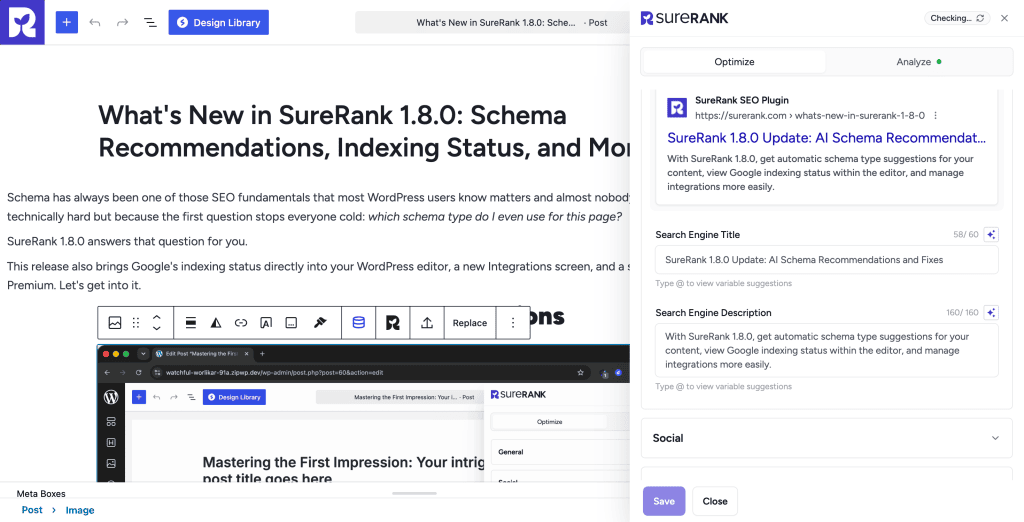
How SureRank handles it: SureRank Pro includes AI meta tag generation built directly into the WordPress editor. One click and your title and description are written, optimised, and ready. No API key needed. No OpenAI account. No separate subscription. It is included with your Pro plan.
For sites with large existing content libraries, SureRank also supports bulk meta generation with AI. You can generate optimised tags for every post or product in a single action, turning a weeks-long backlog into a five-minute job.
This feature alone is valued at $49 per year when purchased as a standalone tool. With SureRank Pro, it is included.
See everything SureRank AI can do for your site.
3. Automate Schema Markup Across Your Entire Site
Schema markup tells search engines exactly what your content is: an article, a product, a review, a recipe, a how-to guide.
Sites that use schema correctly appear in rich results, the enhanced listings in Google search that show star ratings, prices, FAQs, and images alongside the standard link. Rich results earn significantly higher click-through rates than plain blue links.
The problem is that adding schema manually to every page is tedious, technical, and easy to get wrong. Most WordPress users either skip it entirely or apply it inconsistently.
Automated schema removes all of that friction.
- Schema is applied automatically based on your content type.
- It stays updated as Google’s requirements evolve.
- You never have to think about JSON-LD syntax or structured data testing.
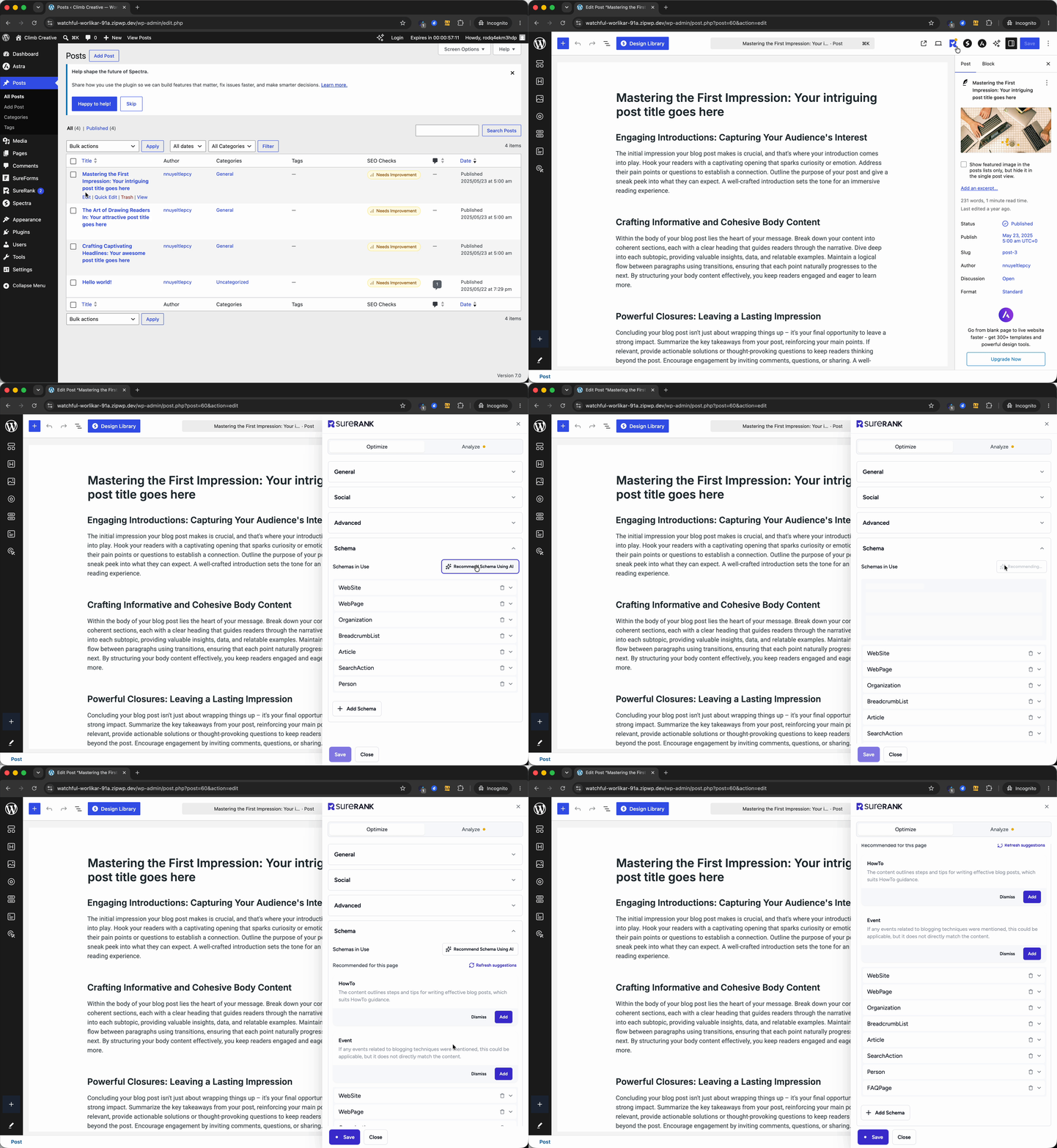
How SureRank handles it: SureRank applies schema automatically across your site from day one, covering articles, products, organisations, breadcrumbs, and more. SureRank Pro unlocks the Advanced Schema Builder for custom types including FAQ, HowTo, Review, and others, giving you full control without any manual coding.
Explore SureRank’s full feature set including schema automation.
4. Automate Internal Linking with AI
Internal linking is one of the highest-impact SEO tasks that almost nobody does consistently.
The reasons are understandable. Finding the right anchor text, identifying the right destination pages, and physically adding links across hundreds of posts is a genuinely time-consuming job. Most site owners add internal links when they remember to, which means new content rarely gets linked from anywhere and older content never gets updated.
This is a real problem. Internal links pass authority across your site, help Google understand your content hierarchy, and keep readers engaged longer. Pages with no internal links pointing to them are essentially invisible to crawlers, even if they contain excellent content.
AI-powered internal link automation changes this completely.
- The AI scans your entire content library and identifies linking opportunities you have missed.
- It suggests relevant anchor text and destination pages for each post.
- New content gets connected to your existing site structure automatically.
How SureRank handles it: SureRank Pro includes an AI-powered Link Manager that tracks and manages all internal links across your site from a single dashboard. You can see which pages are under-linked, find new link opportunities, and manage your entire internal link structure without jumping between individual posts.
Standalone internal link tools cost $149 per year or more. With SureRank Pro, the Link Manager is included.
See how SureRank’s Link Manager works.
5. Automate Image SEO Across Your Media Library
Every image on your site should have an accurate alt text description.
Alt text helps visually impaired users understand your content through screen readers. It also tells search engines what the image shows, making your content eligible to appear in Google Image Search. And it is a minor but real relevance signal for your target keywords.
On a site with 50 or more posts, that means hundreds of images. Writing alt text for each one manually is the kind of task that always gets pushed to “later.”
Automated image SEO handles this across your entire media library.
- The AI analyses each image and generates an accurate, descriptive alt text.
- It can also generate captions and image metadata automatically.
- Existing images and new uploads are both covered.
How SureRank handles it: SureRank Pro uses AI to generate alt tags, captions, and metadata for your images on the fly. It can also bulk-process your entire media library in one action, which means you can fix months of missed image SEO in a single session.
This feature is valued at $49 per year as a standalone tool. It is included in SureRank Pro.
See how SureRank handles image SEO with AI.
6. Automate Your Site-Wide SEO Audit
Most WordPress site owners never audit their sites.
Not because they do not want to. But because running a proper SEO audit manually requires checking dozens of technical factors across every page: meta tags, canonical URLs, Open Graph data, robots settings, schema presence, HTTPS status, sitemap availability, redirect behaviour, and more.
Done properly, a full manual audit takes hours. Most people do it once, never update it, and let problems quietly accumulate.
Automated site audits run in the background and flag issues before they become serious ranking problems.
- They check your entire site against technical SEO criteria on a regular schedule.
- They surface problems with clear explanations, not just raw data.
- You get a prioritised list of fixes rather than having to interpret a crawl report yourself.
How SureRank handles it: SureRank runs a comprehensive site-wide SEO audit covering meta tags, Open Graph data, sitemap availability, schema presence, robots.txt configuration, canonical tags, HTTPS status, and redirect behaviour. SureRank Pro goes further, using AI to not just identify issues but suggest and apply specific fixes. Think of it as having an SEO consultant permanently installed in your WordPress dashboard.
Run your first site audit with SureRank.
7. Automate Open Graph and Social Preview Images
You write a great post. You share it on LinkedIn. The preview shows a blank grey box or a random image from somewhere in the middle of your article.
It looks broken. People scroll past. The post gets a fraction of the engagement it deserved.
This happens because most WordPress sites do not have Open Graph images set for their posts. Setting them manually, one post at a time, is exactly the kind of task that falls through the cracks.
Automated OG image generation solves this permanently.
- Every post gets a professionally branded social preview image generated automatically.
- Your logo and brand colours are applied consistently across all posts.
- You never publish a post that looks broken when shared on social media.
How SureRank handles it: SureRank Pro automatically generates on-brand Open Graph images for every post, page, and product. You set your logo and colours once. SureRank handles every post from that point forward. No design tools required.
This is a Pro-exclusive feature and one of the most immediately visible improvements you will notice after upgrading.
See SureRank Pro’s social preview automation in action.
8. Automate New Page Indexing with Instant Indexing
Publishing a post and waiting two or three weeks for it to appear in Google is one of the most frustrating parts of running a WordPress site.
Google does crawl the web regularly. But regular is not the same as immediate. New pages on newer or smaller sites can sit unindexed for days or weeks, especially if the site does not have a strong crawl budget established.
Instant indexing solves this by notifying search engines directly the moment you publish.
- Google receives a signal the instant your post goes live.
- Indexing typically happens within hours rather than days.
- Your content starts accumulating ranking signals much sooner.
How SureRank handles it: SureRank Pro includes Instant Indexing, which pushes new pages to Google’s Indexing API immediately on publish. No manual Search Console submission required. No waiting around. Your content gets into the index faster, which means it starts earning traffic sooner.
See SureRank’s Instant Indexing feature.
9. Automate Redirect Management When You Change URLs
Changing a URL is one of the most common things that happens on a growing WordPress site.
You clean up a slug. You rename a product. You restructure a category. Every time a URL changes, anyone who previously linked to it, bookmarked it, or found it through Google is now heading to a dead page.
Without a redirect in place, that is a 404 error. A broken experience for visitors. A lost ranking signal for search engines. And a gap in your backlink equity that may never fully recover.
Setting up redirects manually requires editing your .htaccess file or managing a separate redirect plugin. Most people skip this step entirely because the friction is too high in the moment.
Automated redirect management removes that friction completely.
- You get a central dashboard to create and manage redirects without touching any code.
- Redirects are set up in seconds.
- You can manage 301 and 302 redirect types from one place inside WordPress.
How SureRank handles it: SureRank Pro includes a built-in Redirection Manager so you never need a separate redirect plugin. Set up redirects, monitor them, and manage them all from inside your WordPress dashboard.
Learn more about protecting your SEO when you change URLs.
10. Automate SEO Reporting and Performance Monitoring
Most WordPress site owners have no idea which pages are getting traffic, which keywords they rank for, or whether their SEO is moving in the right direction.
Not because they do not care. Because pulling that data manually from Google Search Console, formatting it into something readable, and actually interpreting it is its own separate project.
Automated SEO reporting brings performance data directly to you.
- You see your rankings, impressions, and click data without opening a separate platform.
- Scheduled email reports land in your inbox on a regular cadence.
- You can track progress without context-switching between tools.
How SureRank handles it: SureRank integrates directly with Google Search Console and surfaces your Search Performance Insights inside the WordPress dashboard. You see which keywords are driving impressions, which pages are earning clicks, and where there are clear opportunities to improve, all without leaving WordPress.
SureRank also sends automated email SEO reports on a schedule you choose, so you or your clients stay informed without anyone having to pull a report manually.
Set up search performance tracking with SureRank.
How to Get Started: Your SEO Automation Setup in 5 Steps
If you are starting from zero, here is a practical order to follow.
- Step 1: Install SureRank and run the setup wizard. This handles foundational technical SEO in about five minutes.
- Step 2: Connect Google Search Console through SureRank. This unlocks performance tracking and Instant Indexing.
- Step 3: Enable AI meta tag generation. Run it across your existing content to catch up on any posts missing optimised titles and descriptions.
- Step 4: Bulk-process your media library with AI image SEO. Fix months of missing alt text in one session.
- Step 5: Enable the Link Manager and start building a consistent internal linking structure across your site.
Each step takes minutes to configure. The automation runs in the background from that point on.
Start with the free version of SureRank and see what good SEO automation feels like.
When you are ready for the full AI-powered stack including bulk meta generation, internal link AI, instant indexing, social preview automation, and the complete redirect manager, SureRank Pro starts at $8.25 per month for up to 10 sites. The bundled AI features are worth $249 per year. They are all included in your plan.
Frequently Asked Questions About SEO Automation for WordPress
What is SEO automation for WordPress?
SEO automation for WordPress is the use of plugins and AI to handle routine SEO tasks automatically, including sitemap generation, meta tag creation, schema markup, internal linking, image alt text, redirects, and performance reporting. It removes the need for manual action on every post or page.
Can WordPress SEO really be fully automated?
Most technical and on-page SEO tasks can be fully automated with the right plugin. Sitemap updates, meta tag generation, image SEO, schema application, and redirect management all run without manual input when configured correctly. Strategy and content creation still require human judgment.
What SEO tasks should not be automated?
Topic selection, audience research, content strategy, and editorial judgment cannot and should not be automated. Automation handles execution. Deciding what to write, who you are writing for, and how to position your content against competitors still requires human thinking.
Does SureRank automate SEO for free?
SureRank’s free version automates core SEO tasks including sitemap generation, schema markup, meta tag management, and Search Console integration. The Pro version adds AI-powered automation for meta tag generation, bulk image SEO, internal link management, instant indexing, redirect management, and automated OG image creation.
Is SEO automation safe? Will it hurt my rankings?
When implemented correctly with a reputable tool, SEO automation improves rankings. Automated tasks like sitemap generation, schema markup, and meta tag optimisation are standard best practices. The risk only exists with tools that engage in spammy or manipulative automation. SureRank automates legitimate, best-practice SEO tasks exclusively.
How much time can SEO automation save per week?
Research shows website owners spend between 4 and 7 hours per week on SEO tasks. Automating the execution layer, covering meta tags, image SEO, internal linking, sitemaps, redirects, and reporting, recovers a significant portion of that time and redirects it toward strategy and content creation.
Does SureRank Pro work with WooCommerce stores?
Yes. SureRank includes WooCommerce SEO support in both the free and Pro versions, covering product schema, meta optimisation, and Open Graph for product pages. There is no separate WooCommerce plugin required, unlike competitors who charge extra for it.


Recommended Articles
Where’s the Focus Keyword Field in SureRank?
Where Is the Redirection Feature in SureRank?
Is SEO Dead? Or Is It Evolving Again?