
You write a solid blog post. You spend time on it. You hit publish, share the link on LinkedIn or Twitter, and the preview that shows up is a blank grey box.
No image. No branding. Nothing.
It looks broken. People scroll past. All that effort, and the first impression your content makes on social media is essentially invisible.
This is more common than you’d think. Most WordPress sites have this problem and don’t even realise it. The good news? It’s completely fixable, and with SureRank Pro 1.7.0, it’s now fixed automatically.
What Is an Open Graph Image?
When you share a link on any social platform, Twitter, LinkedIn, Facebook, WhatsApp, even Slack, the platform reads hidden tags in your page’s code and builds a preview card. That card has three things: a title, a short description, and an image.
That image is your Open Graph (OG) image.
It’s the first thing people see before they decide whether to click. A well-designed OG image makes your post stand out in a busy feed. A missing one makes your link look like spam.
The impact is real. Links with a proper OG image consistently get 2–3x more clicks than those without. That’s not a small edge, that’s the difference between content that drives traffic and content that goes nowhere.
Why Most WordPress Sites Don’t Have OG Images
Setting them up manually is tedious. For every post, the traditional workflow looks something like this: open Canva, load the template, update the title text, resize if it’s too long, export as PNG, go back to WordPress, upload to the media library, set it in your SEO plugin. Then do it all again for the next post.
For a site publishing regularly, that’s hours of repetitive work every month. Most teams skip it. Most solo site owners skip it. And their content keeps looking broken on social, quietly, invisibly, every single day.
Introducing OG Image Generation in SureRank Pro 1.7.0
SureRank Pro 1.7.0 removes this problem entirely.
Open Graph image generation is now built directly into your WordPress dashboard. You configure it once, upload your logo, choose your brand colors, pick a template, and from that point forward, every post you publish automatically gets a professionally generated OG image. No Canva. No Photoshop. No manual uploads. Just publish, and it’s handled.
Setting It Up Takes Less Than 2 Minutes
Here’s exactly what to do:
Step 1: Update SureRank Premium to v1.7.0
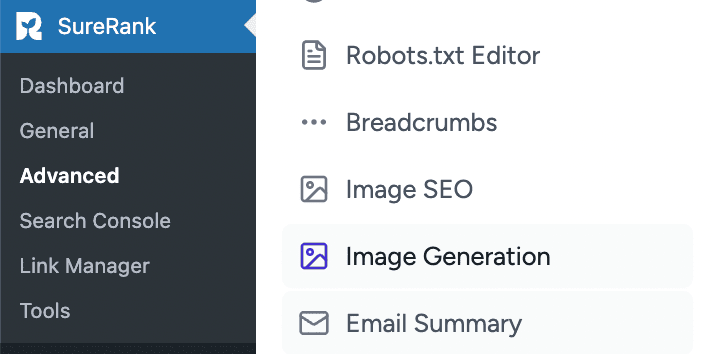
Go to your WordPress dashboard → Plugins → and update SureRank Premium. Once updated, you’ll see a new Image Generation option inside SureRank’s Advanced settings.
Step 2: Go to SureRank → Advanced → Image Generation
This is where all the setup happens.
Step 3: Pick a Template
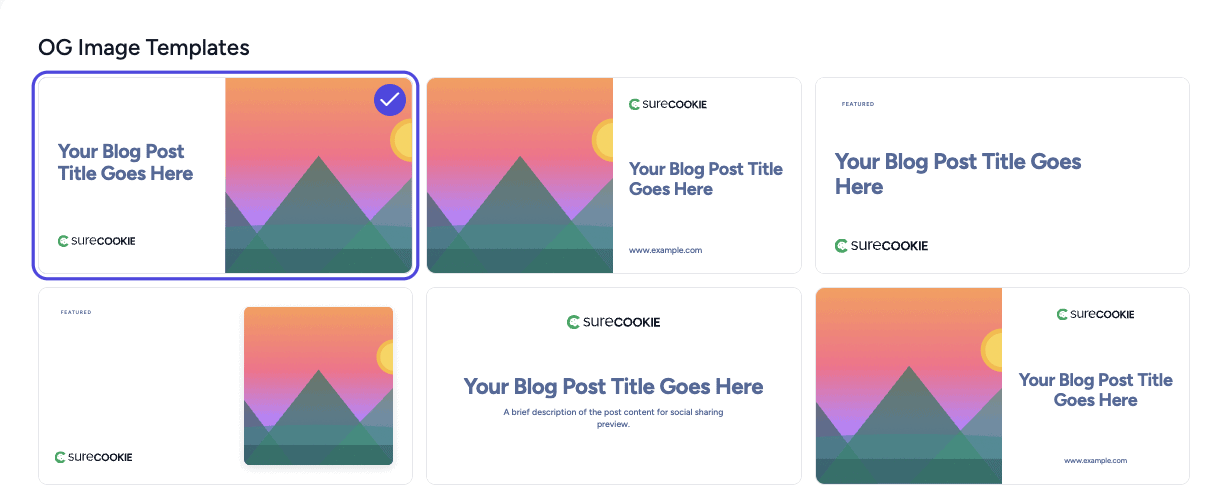
SureRank gives you six pre-designed OG image templates with different layouts, some bold and image-heavy, some clean and text-forward. Choose the one that fits your site’s style. You can change it anytime.
Step 4: Upload Your Brand Logo
Add your site logo here. SureRank places it inside every generated image, so every social share card is recognisably yours. A PNG with a transparent background works best.

Step 5: Choose Your Color Palette
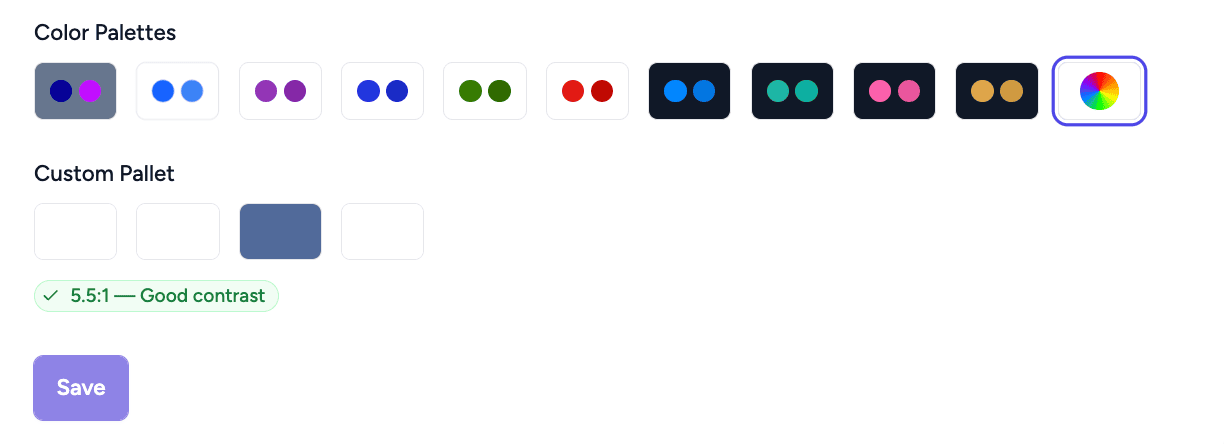
Select from ten preset palettes or enter your own brand hex codes using the Custom Palette option. This controls the background and accent colors across all your OG images, set it once and every image stays consistent.
Step 6: Save
Hit Save. Done.
Every new post you publish from here will have an OG image generated automatically. And your already-published posts? Covered too, SureRank generates images for your existing content without you having to go back and update anything manually.
Want to Override a Specific Post?
You can. Inside any post’s SureRank meta box, you can upload a custom image that replaces the auto-generated one for that post only. Everything else stays on automatic.
Available Now in SureRank Premium v1.7.0
If you’re already on SureRank Pro, update from your Plugins page, this feature is included in your current plan at no extra cost.
If you’re still on the free version, this is a good time to explore what Premium has to offer. OG Image Generation sits alongside Full Site SEO Audit, Search Performance Insights, Built-in AI Writing, Content Gap Analysis, and Instant Google Indexing.
Your content deserves to look good everywhere, not just on your site.
👉 [Upgrade to SureRank Pro →]
👉 Already on Pro? Update Now →


Recommended Articles
Where’s the Focus Keyword Field in SureRank?
Where Is the Redirection Feature in SureRank?
Is SEO Dead? Or Is It Evolving Again?