
- Sitemaps in SureRank
- How to Enable Video Sitemap in SureRank Pro
- How to Enable the News Sitemap in SureRank
- How to Show the HTML Sitemap on Your Site in SureRank Pro
- How to Regenerate the Sitemap After Excluding a Post Type in SureRank
- Change the Sitemap URL in SureRank
- How to Enable Author Sitemap in SureRank
- How to Fix WWW and Non-WWW Version Redirects to Improve Your SEO
- How to Fix: No H1 Heading Found on Your Homepage
- How to Fix Missing H2 Headings on Your Homepage
- Re-run Checks Button in SureRank
- Fix Critical Error: Another SEO Plugin Detected in SureRank
- Fix Warning: Site Tagline Is Not Set in SureRank
- How to Fix Multiple SEO Plugins Detected on Your Site
- How to Fix: Homepage is Not Indexable by Search Engines
- Warning: Homepage Does Not Contain Internal Links
- How to Fix Missing Alt Text on Homepage Images
- How to Fix Missing Canonical Tag on Your Homepage
- How to Fix Missing Open Graph Tags on Your Homepage
- How to Fix Missing Structured Data (Schema) on Your Homepage
- How to Fix XML Sitemap is Not Accessible in SureRank
- How to Fix Search Engine Visibility Blocked in WordPress
- Connect Google Search Console
- How to Fix Site Not Served Over HTTPS in SureRank
- How to Fix Robots.txt File Accessibility Issues in SureRank
- How to Fix Missing Search Engine Title on Your Home Page
- How to Fix Home Page is Not Loading Correctly
- How to Fix No Images Found on the Homepage Warning
- SureRank – Internal Link Suggestions
- How to Fix: Search Engine Title is Missing on the Page
- Page Level SEO: Broken Links Detected
- How to Fix Missing Alt Text on Images
- How to Fix Page URLs That Are Too Long
- Page Level SEO Warning: No Links Found on This Page
- Page Level SEO Warning: No Images or Videos Found
- Page Level SEO Warning: Missing Search Engine Description
- Page Level SEO Warning: No Subheadings Found on This Page
- Page Level SEO Warning: Canonical Tag is Missing
- Page Level SEO Warning: Open Graph Tags Missing
- What is Google Search Console and how does SureRank use it?
- Recommended Image Sizes
- SureRank – SEO Check Severity Guide
- Using SureRank with Other SEO Plugins – Best Practices
- Import/Export Feature – SureRank Plugin
- What is llms.txt and Does SureRank Support It?
- Does SureRank offer a keyword rank-tracking feature?
- Does SureRank Come With Google Analytics Integration?
- Customize Final Title Tag surerank_final_title
- Customize Post Type Archive Title Output surerank_post_type_archive_title
- Customize Archive Page Title with surerank_archive_title
- CustomizeModify the Search Results Page Title surerank_search_title
- Customizing the 404 Page Title surerank_not_found_title
- Customizing the Title Separator surerank_title_separator
- How to Remove Archive Prefixes from Titles Using SureRank
- Customize Homepage Pagination Format surerank_homepage_pagination_format
- Customize Maximum SEO Title Length surerank_title_length
- Enable/Disable Pagination in SureRank Archives surerank_show_pagination
Fix Critical Error: Another SEO Plugin Detected in SureRank
When running the Site SEO Analysis in SureRank, you may see this critical error message: Another SEO plugin, such as Yoast SEO, Rank Math, or All in One SEO, is detected on your site.
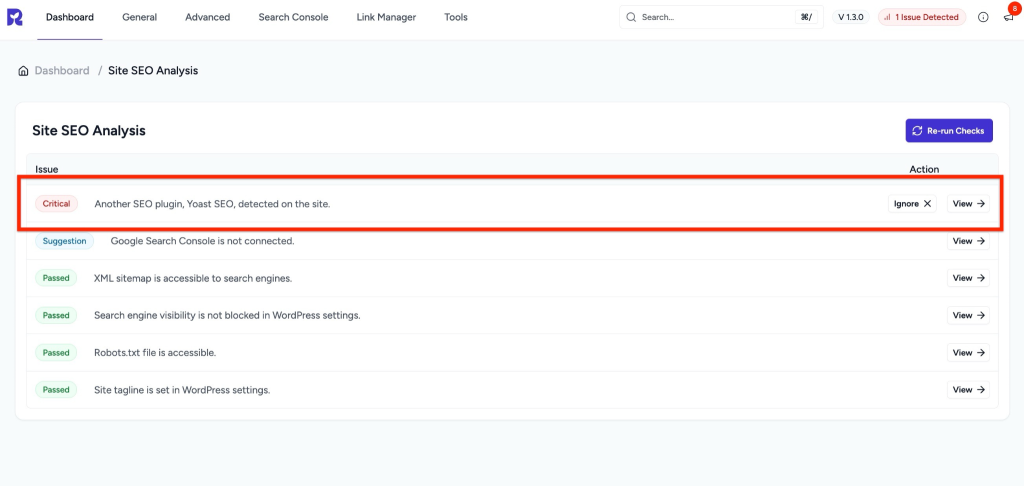
This happens because running multiple SEO plugins at the same time can cause conflicts. Each plugin tries to add its own meta tags, schema, and sitemaps, which can confuse search engines and harm your site’s SEO performance.
Why This Error Appears
- You have more than one SEO plugin installed (e.g., Yoast SEO, Rank Math, or All in One SEO) along with SureRank.
- These plugins overlap in functionality like meta titles, descriptions, and schema markup.
- Search engines may receive duplicate or conflicting SEO signals.
How to Fix the Issue
Follow these steps to resolve the conflict:
- Identify the active SEO plugins
- Go to your WordPress dashboard.
- Navigate to Plugins > Installed Plugins.
- Look for SEO plugins such as Yoast SEO, Rank Math, or All in One SEO.
- Deactivate other SEO plugins
- If you want to use SureRank, deactivate Yoast, Rank Math, or any other SEO plugin.
- To do this, click the Deactivate button under the plugin name.
- Migrate SEO settings (Optional but Recommended)
- Before deactivating, you can migrate your existing SEO settings to SureRank.
- SureRank provides a Migration Tool to import settings from Yoast, Rank Math, or All in One SEO.
- Re-run Site SEO Analysis again
- After removing other SEO plugins, run the Site SEO Analysis in SureRank.
- The critical error should no longer appear.
Important Notes
- Always keep only one SEO plugin active at a time.
- If you’re switching from another SEO plugin, migrating your settings ensures you don’t lose important SEO data.
- Keeping SureRank as the only SEO plugin will prevent conflicts and improve performance.
Was this doc helpful?
What went wrong?
We don't respond to the article feedback, we use it to improve our support content.
On this page