
If you’ve ever published a blog post and watched it sit at zero visitors for months, there’s a good chance you skipped one vital step.
Keyword research is the most overlooked part of content creation for WordPress beginners.
It’s also the most impactful.
You can write brilliantly and still get no traffic if nobody’s searching for what you wrote.
Keyword research fixes that. It tells you what people are actually typing into Google so you can write content they’re already looking for.
This guide walks you through the whole process, step by step, with no assumed knowledge and no unnecessary complexity.
What Is Keyword Research?
Keyword research is the process of finding the exact words and phrases people type into search engines when they’re looking for something.
When you know those phrases, you can write content that matches what people are searching for, which gives your posts a real chance of showing up in search results.
Every keyword you evaluate should pass three checks:
- Search volume tells you how many people search for that phrase each month. A keyword with no search volume won’t bring traffic no matter how well you write.
- Keyword difficulty (KD) tells you how hard it’ll be to rank. It’s usually scored from 0 to 100. A score of 70+ means you’re competing against established, high-authority sites. As a new or growing site, that’s a battle you’re unlikely to win early on.
- Search intent tells you what the person actually wants when they type that phrase. Are they trying to learn something? Buy something? Find a specific website? Your content needs to match their intent, or it won’t rank, regardless of how well-optimized it is.
All three matter. High volume with no intent match is wasted effort. Low difficulty with no volume is a dead end.
The goal is finding keywords where all three work in your favor.
Step 1: Understand Search Intent Before Anything Else
Search intent is the reason behind a search. Google has gotten very good at understanding it and your content needs to match it.
There are three main types:
- Informational intent means the person wants to learn. Searches like “how to add a contact form to WordPress” or “what is a focus keyword” fall here. Blog posts, guides and tutorials are the right format.
- Commercial intent means the person is researching before buying. They’re comparing options. Searches like “best WordPress SEO plugins” or “SureRank vs Yoast” show commercial intent. Comparison posts and review-style content work well here.
- Navigational intent means the person is looking for a specific site or page. They already know where they want to go. You can’t really compete for navigational searches unless it’s your own brand.
A common mistake is writing a product or sales page for a keyword with informational intent.
Google will rank an informational post above a sales page every time for that type of query, because that’s what the searcher wants.
Before you target any keyword, ask yourself “what does someone clicking this result actually want to find?”
Then make sure your content delivers exactly that.
Step 2: Brainstorm Seed Keywords for Your Niche
A seed keyword is a short, broad phrase that describes your topic. It’s your starting point, not your target.
The key here is to think like your reader, not like a business owner or expert.
Your reader isn’t using technical jargon. They’re typing “how do I get my blog to show up on Google,” not “organic search visibility optimization strategy.”
Start with two or three broad phrases that describe what your site is about.
If you run a WordPress blog about personal finance, your seeds might be “save money,” “budgeting tips,” or “how to pay off debt.”
Then use these free tools to expand:
- Google Autocomplete fills in suggestions as you type. Every suggestion is a real phrase people have searched for. Type your seed keyword and note everything that appears.
- People Also Ask is the expandable question box that appears in Google search results. Each question is a keyword opportunity with informational intent built in.
- Related Searches appear at the bottom of the results page. It shows you adjacent phrases that people also search after looking at results for your seed keyword.
Between these three, you can turn one seed keyword into 20 or more content ideas, all for free, in under 30 minutes.
Step 3: Use Keyword Research Tools
Once you have a list of potential keywords, you need data to evaluate them.
Here are the tools worth knowing:
Free tools
- Google Search Console shows you what keywords your existing pages already rank for, along with click and impression data. If you haven’t set it up yet, do that first. It’s free and gives you real data about your own site.
- Google Keyword Planner is designed for Google Ads, but it provides useful volume and competition data for organic research. You’ll need a free Google Ads account to access it.
- Ubersuggest offers free keyword data including volume, difficulty scores and content ideas. The free plan has daily limits but it’s a solid starting point.
Paid tools
Ahrefs and Semrush are the industry standards. They give you the most accurate difficulty scores, detailed competitor analysis and large keyword databases.
They’re worth the investment once your site is growing and you’re producing content at volume.
For absolute beginners, the free tools will get you started without the monthly cost.
SureRank’s built-in keyword suggestions
If you’re using SureRank on your WordPress site, you don’t need to bounce between external tools.
SureRank includes keyword suggestions directly inside the WordPress editor.
As you set up your post, it highlights related keyword ideas you can target and shows you how your content is performing against your chosen focus keyword.
For beginners who don’t want to pay for Ahrefs or learn a new platform, this is the most practical starting point.
Your keyword research happens in the same place you write your content.
Step 4: Evaluate Keywords by Volume, Difficulty and Opportunity
Now that you have a list and some data, it’s time to filter.
- Keyword difficulty is the most important filter for new sites. As a general rule, target keywords with a KD score under 30 when you’re starting out. These are topics where you can realistically rank without years of authority-building.
- Long-tail keywords are longer, more specific phrases with lower search volume but much lower competition. “WordPress SEO keyword research for beginners” gets far fewer searches than “SEO,” but you can actually rank for it. Long-tail keywords also tend to convert better because the person searching is much more specific about what they want.
- Traffic potential is different from search volume. A keyword might show 200 monthly searches, but if it ranks for 15 related phrases, the actual traffic opportunity could be 2,000 visits a month. Tools like Ahrefs show this directly. If you’re using free tools, look at the broader topic and consider all the related terms that a well-written post could rank for.
The sweet spot for a new WordPress site is a long-tail keyword with a KD under 30, a clear informational intent, and a topic broad enough that you can naturally cover related phrases in the same post
Step 5: Pick Your Primary and Secondary Keywords
Once you’ve evaluated your list, it’s time to assign keywords to content.
- One primary keyword per post. This is a hard rule. Your primary keyword is the phrase you’re optimizing most directly for. It should appear in your title, your first paragraph, at least one subheading and naturally throughout your content.
- Secondary keywords are related phrases that support the same topic. If your primary keyword is “keyword research for WordPress,” your secondary keywords might include “how to find keywords for a WordPress blog” and “WordPress SEO keyword research.” These can appear naturally throughout your content without any forced repetition.
- Keyword mapping means assigning each keyword on your list to a specific piece of content, so no two posts compete with each other for the same phrase. Build a simple spreadsheet with your content calendar, one column for the post title, one for the primary keyword, one for secondary keywords. This keeps your site’s content architecture clean and prevents cannibalization, where two of your own posts compete against each other in search results.
Step 6: Set Your Focus Keyword in SureRank
Once you’ve chosen your primary keyword, SureRank makes the next step easy.
In the WordPress editor, open the SureRank panel on the right side of your screen. Enter your chosen focus keyword in the field provided.
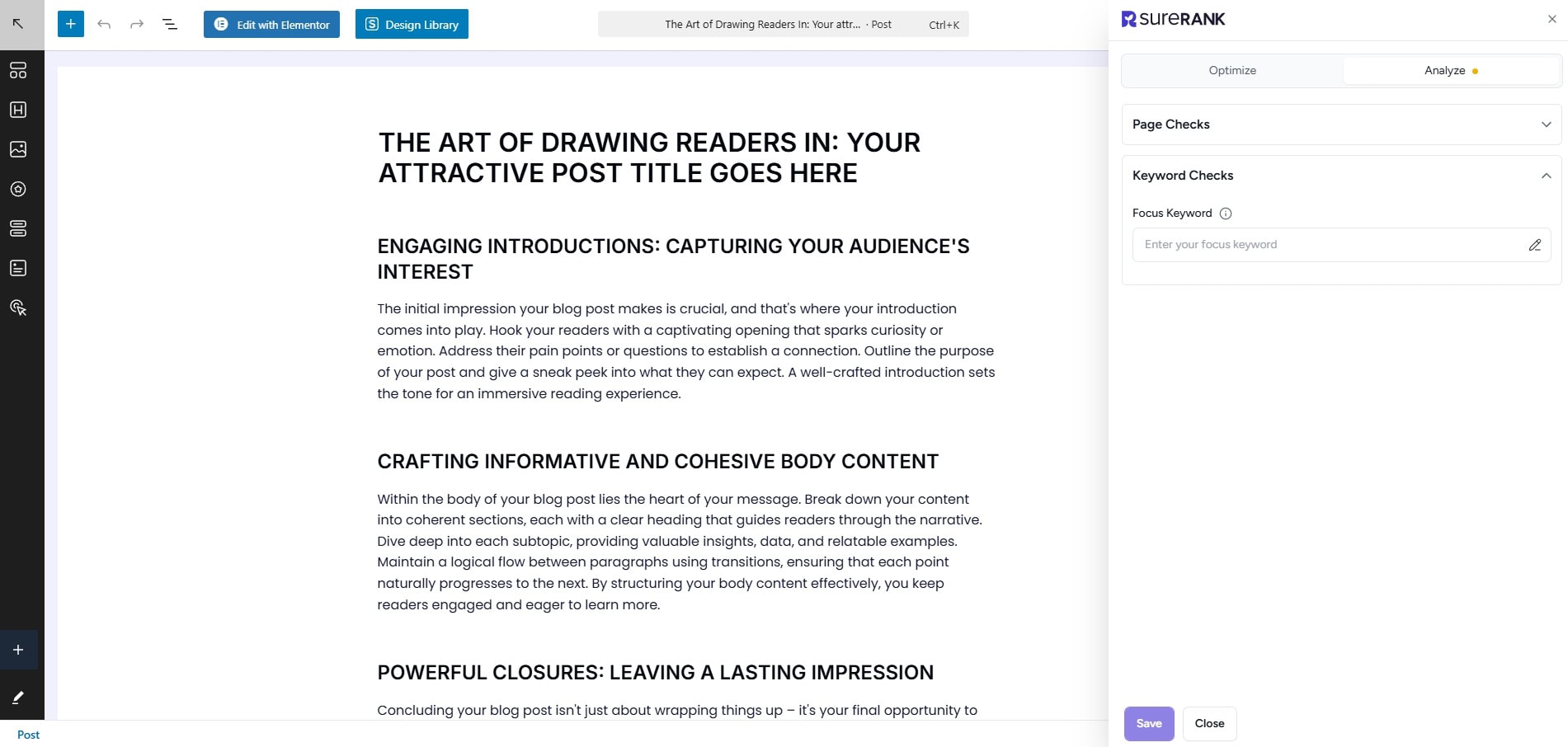
SureRank will immediately analyze your post against that keyword and generate an on-page optimization score.
That score reflects how well your content is set up to rank for the keyword you’ve chosen.
It checks things like whether your keyword appears in the title, meta description, headings, first paragraph and image alt text, among other factors.
Work through the suggestions before you hit publish. Each recommendation is specific and actionable.
You’re not guessing at what Google wants to see; you’re following a clear checklist that’s been built around real ranking factors.
This is where keyword research connects directly to content execution. You’ve found the right keyword, and now SureRank helps you make sure the post is actually built to rank for it.
[Set your first focus keyword free with SureRank.]
Common Keyword Research Mistakes to Avoid
Even with a solid process, a few patterns tend to trip up beginners.
- Targeting keywords that are too competitive too early. Chasing high-volume, high-difficulty keywords is tempting, but it rarely works for new sites. Build domain authority with winnable keywords first, then graduate to harder targets over time.
- Ignoring search intent. You can have the right keyword and still get zero traffic if your content doesn’t match what the searcher actually wants. Always check the intent before you write.
- Targeting multiple primary keywords in one post. One post, one primary keyword. That’s the rule. Secondary keywords can support it, but trying to rank for three separate primary phrases in the same post dilutes everything.
- Never revisiting your keyword strategy. Keyword research isn’t a one-time task you do when you launch a site. Search trends shift, your domain authority grows, and new opportunities open up. Review your keyword strategy every few months and update your content calendar accordingly
Conclusion
Keyword research is the step that makes everything else you do with content actually work.
Without it, you’re writing for yourself. With it, you’re writing for an audience that’s already looking for what you have to say.
Start simple. Pick one keyword, write one post, and optimize it properly before moving on. As your site grows, your keyword strategy can grow with it.
SureRank brings the whole process inside WordPress, from keyword suggestions to on-page scoring, so there’s no reason to delay.
You don’t need an expensive SEO subscription to get started. You just need to know what you’re writing before you write it.
Suggestion
Keyword Research FAQs
How do I find keywords for my WordPress blog?
Start with free tools: Google Autocomplete, People Also Ask and Google Search Console. Then use a keyword tool like Google Keyword Planner or Ubersuggest to check volume and difficulty. If you’re using SureRank, it highlights keyword suggestions inside WordPress as you write.
What’s a good keyword difficulty score for beginners?
Aim for a KD score under 30 when you’re starting out. This puts you in territory where you can realistically rank without needing years of backlinks and domain authority behind you.
Is Google Keyword Planner good for WordPress SEO?
Google Keyword Planner is a solid free option. The volume data is shown in ranges rather than exact figures, which is a limitation, but it’s genuinely useful for understanding relative demand and finding keyword ideas. Pair it with Google Search Console for the most useful free setup.
How many keywords should I target per blog post?
One primary keyword and two to five secondary keywords per post is a practical target. Your primary keyword drives the structure and optimization of the post. Secondary keywords appear naturally within the content without any forced repetition.
Does SureRank help with keyword research?
Yes. SureRank includes built-in keyword suggestions inside the WordPress editor, so you can explore related keyword ideas without leaving your dashboard. Once you’ve set a focus keyword, it analyzes your content and gives you a real-time optimization score based on how well your post is built to rank for that phrase.


Recommended Articles
Where’s the Focus Keyword Field in SureRank?
Where Is the Redirection Feature in SureRank?
Is SEO Dead? Or Is It Evolving Again?