
Schema has always been one of those SEO fundamentals that most WordPress users know matters and almost nobody actually sets up. Not because it’s technically hard but because the first question stops everyone cold: which schema type do I even use for this page?
SureRank 1.8.0 answers that question for you.
This release also brings Google’s indexing status directly into your WordPress editor, a new Integrations screen, and a solid round of fixes across Core and Premium. Let’s get into it.
AI-Powered Schema Recommendations
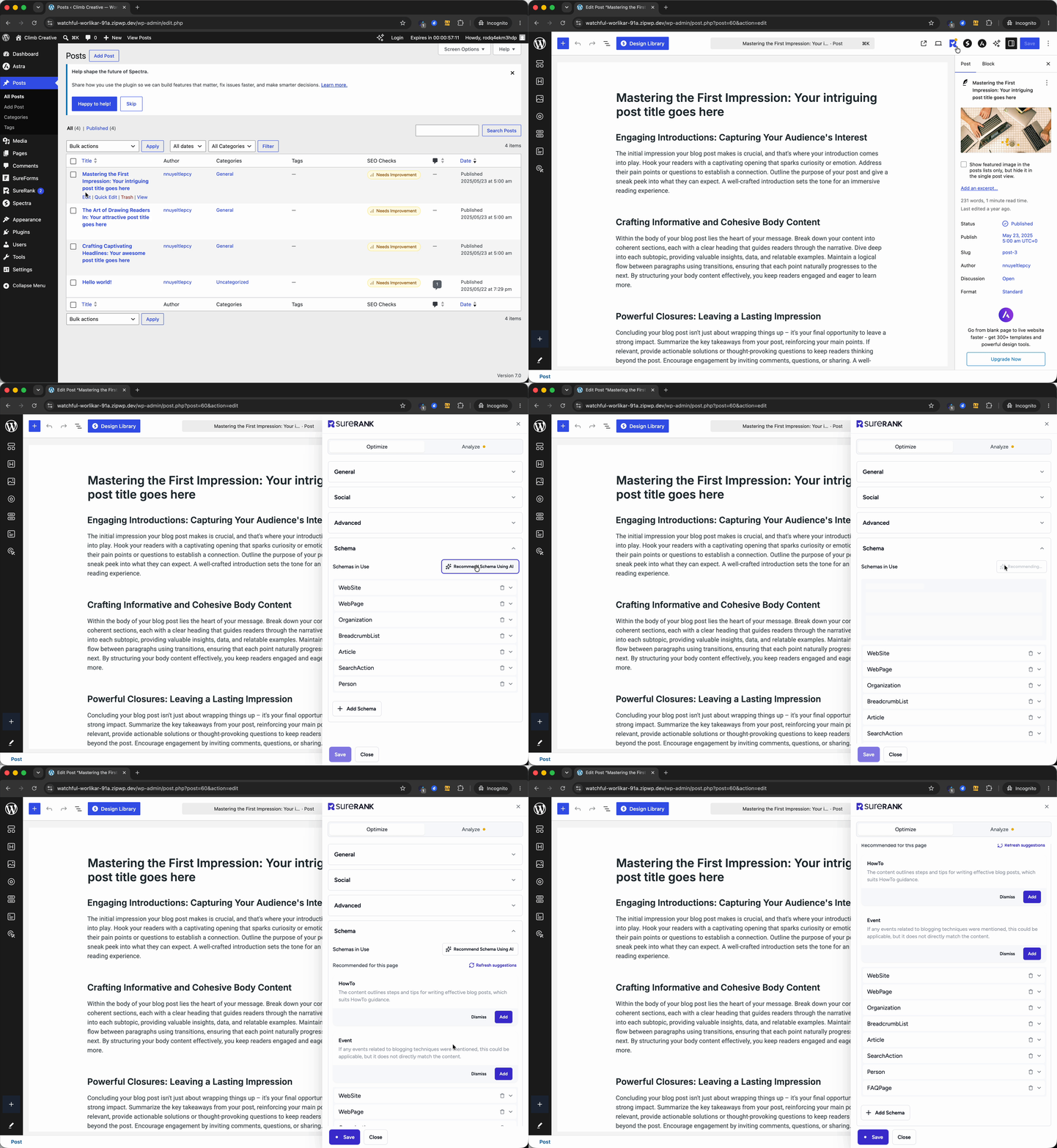
Open the Schema tab on any post or page and SureRank now analyzes your content and recommends the right schema types for that specific piece.
Writing a step-by-step guide? It suggests HowTo. Publishing an event? Event schema. Running a local business page? LocalBusiness. It reads what’s on the page and makes the recommendation, you review it, apply it, move on.
This matters because schema markup directly influences how your content appears in search results. Rich snippets, FAQ dropdowns, star ratings, event listings.
Google uses structured data to surface your content in more places. Most sites are leaving this entirely on the table because the setup felt like too many decisions. After this update, it isn’t.
Google Indexing Status Inside Your Editor
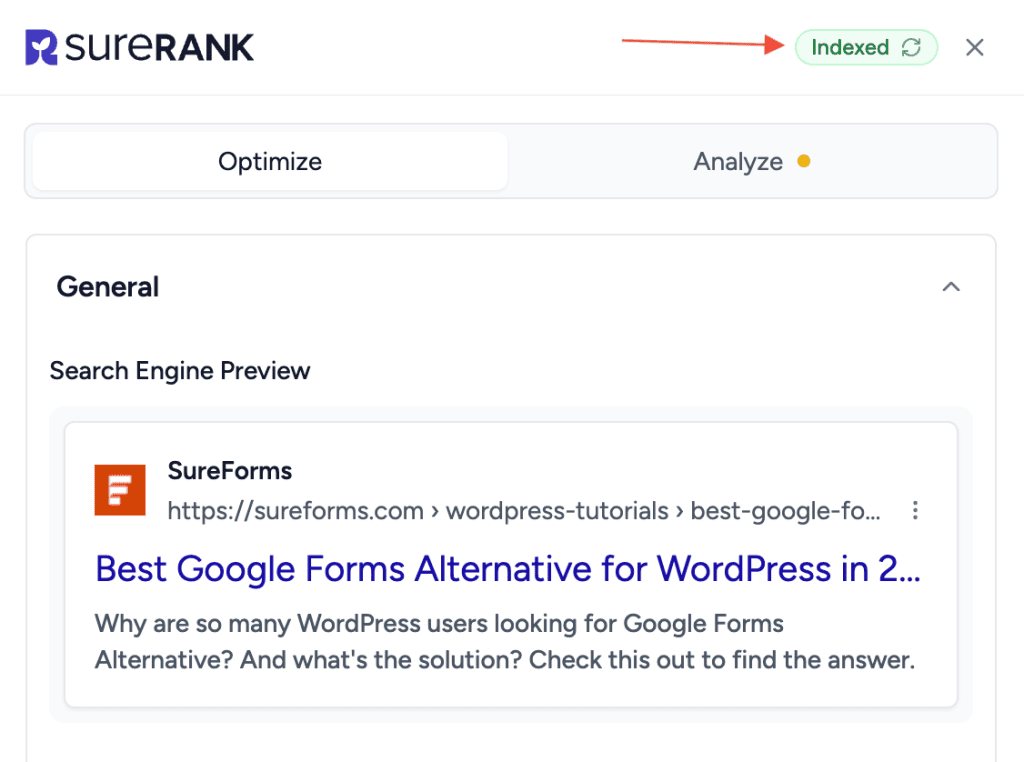
Checking whether Google has indexed a page used to mean leaving WordPress, opening Search Console, navigating to URL Inspection, pasting in the URL, and waiting for the result. Most people only did it when something was clearly wrong.
SureRank 1.8.0 puts that information directly inside the SEO meta box.
While editing any post or page, you can now see the Google Search Console URL Inspection status alongside your Meta Title, Description, and other SEO settings. Indexed, not indexed, crawl errors all visible without switching tabs.
This is most useful in two moments: right after you publish something new and want to confirm Google picked it up, and when a page that should be ranking simply isn’t showing up anywhere.
New Integrations Settings Page
SureRank now has a dedicated Integrations settings page, a single place to enable or disable specific integrations rather than hunting through different settings screens.
In 1.8.0, it launched with toggles for WooCommerce and Angie. As more integrations are added over time, this becomes the central place to manage all of them.
What Else Got Fixed and Improved
Smarter cron detection. If your server runs a real server-side cron instead of WP-Cron, SureRank now detects that correctly. The false cron warning that was appearing for users on managed hosts is gone.
Migration is more complete. Deactivating your previous SEO plugin after migrating to SureRank now works correctly for every supported plugin including The SEO Framework and Slim SEO, which had a gap before this release.
Role Manager permissions fixed. Users with Global Settings access no longer hit a permission error on the Site Information settings page.
PHP resilience improved. Servers missing the mbstring extension no longer trigger fatal errors in the analyzer and description helper.
TranslatePress sitemap compatibility completed. Excluded path wildcards now work correctly on TranslatePress multilingual sites, the last remaining edge case from the multilingual rollout is resolved.
Also in Premium 1.7.2
- SEOPress migrations now correctly carry over the author sitemap toggle
- Role Manager now allows delegated roles to manage Integration toggles
- Pro and free deactivate in sync. No more errors if the free plugin is deactivated first
- Translations updated across all supported languages
A few more things:
A few more useful additions landed in this release too. You can now preserve a post’s modified date during programmatic updates, which is helpful when you need to make backend changes without making a page appear newly updated. You can learn more in the Preserve Modified Date During Updates doc.
We also added support for automatically opening external links in a new tab with the proper security attributes applied. If you want to explore that, see the Open External Links in New Tab doc.
And for agencies or custom client setups, SureRank now supports white-label customization for the sitemap top bar. You can read more in the Customize XML Sitemap Top Bar doc.
Get the Update
SureRank 1.8.0 is available now. Update from your WordPress Plugins page and everything above is live on your site.
If you’re new to SureRank, start with the free plugin on WordPress.org it covers schema, sitemaps, site audits, GSC integration, redirects, and now AI schema recommendations, all at no cost.
If you want AI-powered meta generation, internal link suggestions, automatic social preview images, advanced schema types, and instant Google indexing, SureRank Pro unlocks the full toolkit.


Recommended Articles
Where’s the Focus Keyword Field in SureRank?
Where Is the Redirection Feature in SureRank?
Is SEO Dead? Or Is It Evolving Again?